If you've ever opened your browser's network tab during a video and seen a request for a file ending in .m3u8 or .mpd — or a URL like videodelivery.net/.../manifest/video.m3u8 — you've met a streaming manifest. It's the small text file that makes modern streaming work: the player reads it first to find out what the stream contains and where its pieces live. Understanding manifests explains how a video knows to drop to a lower quality on a weak connection, and why you can't just "download the video" from one. Here's what a manifest file is, what's inside it, and how HLS and DASH use it.
A streaming manifest file is a text file that tells a video player where to find the pieces of a stream and what quality levels exist. In HLS it's an.m3u8playlist; in DASH it's an.mpd(XML). The player reads the manifest first, then fetches the small video segments it lists — switching quality on the fly for smooth adaptive playback. The manifest holds no video itself; it's the index.
What is a manifest file in video streaming?
A manifest file is a small text index that describes a video stream: the quality levels (renditions) available, where each one's media segments are, their durations, and details about audio, subtitles and encryption. Modern streaming doesn't send one big video file — it chops the content into short segments (typically 2–10 seconds) and offers several quality versions of each. The manifest is the map that ties all of that together. When you press play, the player downloads the manifest, reads it, and uses it to decide which quality to request and which segments to fetch next. Without the manifest, the player would have no idea what pieces exist or how to assemble them.
What's inside a manifest file?
A manifest lists renditions (quality levels), segment URLs, durations, and metadata like codecs, resolution, bitrate, audio/subtitle tracks and any encryption keys. An HLS manifest is plain UTF-8 text built from #EXT tags. Here's a simplified master playlist that lists two quality levels:
#EXTM3U
#EXT-X-STREAM-INF:BANDWIDTH=2000000,RESOLUTION=1280x720
720p.m3u8
#EXT-X-STREAM-INF:BANDWIDTH=800000,RESOLUTION=640x360
360p.m3u8
Each line points to a media playlist, which lists the actual segments for that quality:
#EXTM3U
#EXT-X-TARGETDURATION:6
#EXTINF:6.0,
segment0.ts
#EXTINF:6.0,
segment1.ts
#EXT-X-ENDLIST
A DASH manifest (.mpd) carries the same idea in XML instead of tags. Either way, it's just text you can open in any editor — no video data inside, only pointers and instructions.
HLS vs DASH manifests: .m3u8 vs .mpd
| HLS manifest | DASH manifest | |
|---|---|---|
| File extension | .m3u8 | .mpd |
| Format | Plain UTF-8 text with #EXT tags | XML (Media Presentation Description) |
| Created by | Apple | MPEG (open standard) |
| Best support | Apple devices, Safari, virtually everywhere | Android, Chrome, smart TVs; not native on Apple |
| Segments | .ts or fragmented MP4 | Fragmented MP4 |
Both do the same job — describe an adaptive stream — and many platforms publish both so every device gets the format it prefers. For a deeper look at HLS specifically, see our guide to what M3U8 files are.
Master playlist vs media playlist
HLS (and DASH) use two levels of manifest, and the distinction is the key to understanding them. The master playlist is the top-level file the player loads first; it lists the available quality renditions (1080p, 720p, 480p…) with their bitrates and resolutions. Each rendition points to a media (variant) playlist, which lists the actual segments for that one quality in play order. So the player reads the master, picks a starting quality based on the current connection, loads that rendition's media playlist, and begins downloading segments — then swaps to a different variant if bandwidth changes. This two-tier structure is exactly what makes adaptive quality possible.
How the player uses the manifest (adaptive streaming)
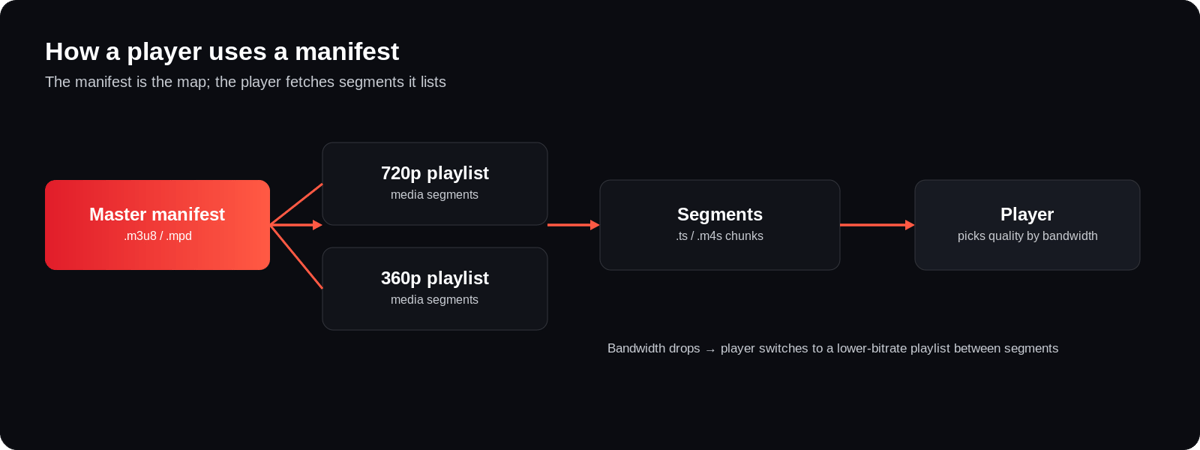
The manifest is what powers adaptive bitrate (ABR) streaming. The player loads the master manifest, measures the available bandwidth, and requests the highest quality the connection can sustain. It downloads that rendition's segments one after another, continuously re-checking the network. If the connection weakens, it switches to a lower-bitrate rendition (listed in the same master manifest) at the next segment boundary to avoid buffering; if it improves, it steps back up. For live streams, the media playlist is updated continuously — new segments are appended as they're encoded and the #EXT-X-ENDLIST tag is absent, which is how the player knows the stream is ongoing. All of this depends on getting the content ingested, encoded and delivered correctly upstream.
Manifest URLs you see in the wild
If you inspect real streaming sites, you'll spot manifest URLs from major providers — and searches for them are common. videodelivery.net/.../manifest/video.m3u8 is Cloudflare Stream's delivery domain serving an HLS manifest; the equivalent DASH manifest ends in .mpd. manifest.googlevideo.com is part of how YouTube delivers its adaptive streams. Seeing these simply means the site uses adaptive streaming: the page loads a manifest, and the player fetches segments from it. You generally can't play these URLs directly outside their intended player because of tokens, DRM and CORS restrictions — the manifest is the entry point to a protected pipeline, not a public download link.
Is a manifest file a video?
No. A manifest is not a video — it's an index that references video, the way a playlist references songs rather than containing them. The actual footage lives in the segment files (.ts or .m4s) the manifest points to. That's why you can't hand someone "the video" as a single .m3u8, and why opening a manifest without access to its segments plays nothing. It's the map, not the territory — the player uses it to go and fetch the real media over the network.
How do you open or inspect a manifest file?
Because a manifest is just text, you can open it in any editor or view it in your browser's developer tools. In Chrome or Firefox, open DevTools → Network, filter by "m3u8" or "mpd" while a video plays, and you'll see the manifest request — click it to read the contents. A plain text editor shows the tags (#EXTM3U, #EXT-X-STREAM-INF) and segment URLs directly. Desktop players like VLC can open an .m3u8 URL and stream it, provided the segments are reachable and unprotected. If you open a manifest and nothing plays, it's usually because the segment URLs require a token, are DRM-protected, or the stream is offline — the file itself is fine; it's just an index pointing at media you can't reach directly. This is also why a .manifest or .m3u8 you find on its own is harmless to open: there's no executable code inside, only URLs and directives.
How manifests are created and delivered
Manifests aren't written by hand — they're generated automatically when your content is encoded and packaged. A streaming pipeline transcodes your source into an adaptive-bitrate ladder, splits each rendition into segments, and writes the master and media manifests that tie them together, then serves everything over a CDN. Getting this right — correct manifest tags, aligned segments across renditions, both HLS and DASH, plus encryption for protected content — is exactly what a streaming platform automates. Enveu's Content Manager transcodes to adaptive bitrate up to 4K, packages as standards-compliant HLS and DASH, and delivers via integrated CDN across every device — so you get correct manifests and smooth playback without hand-building playlists. It's part of Enveu's platform, whether you're running live or on-demand video at scale.