The streaming CMS for video at scale
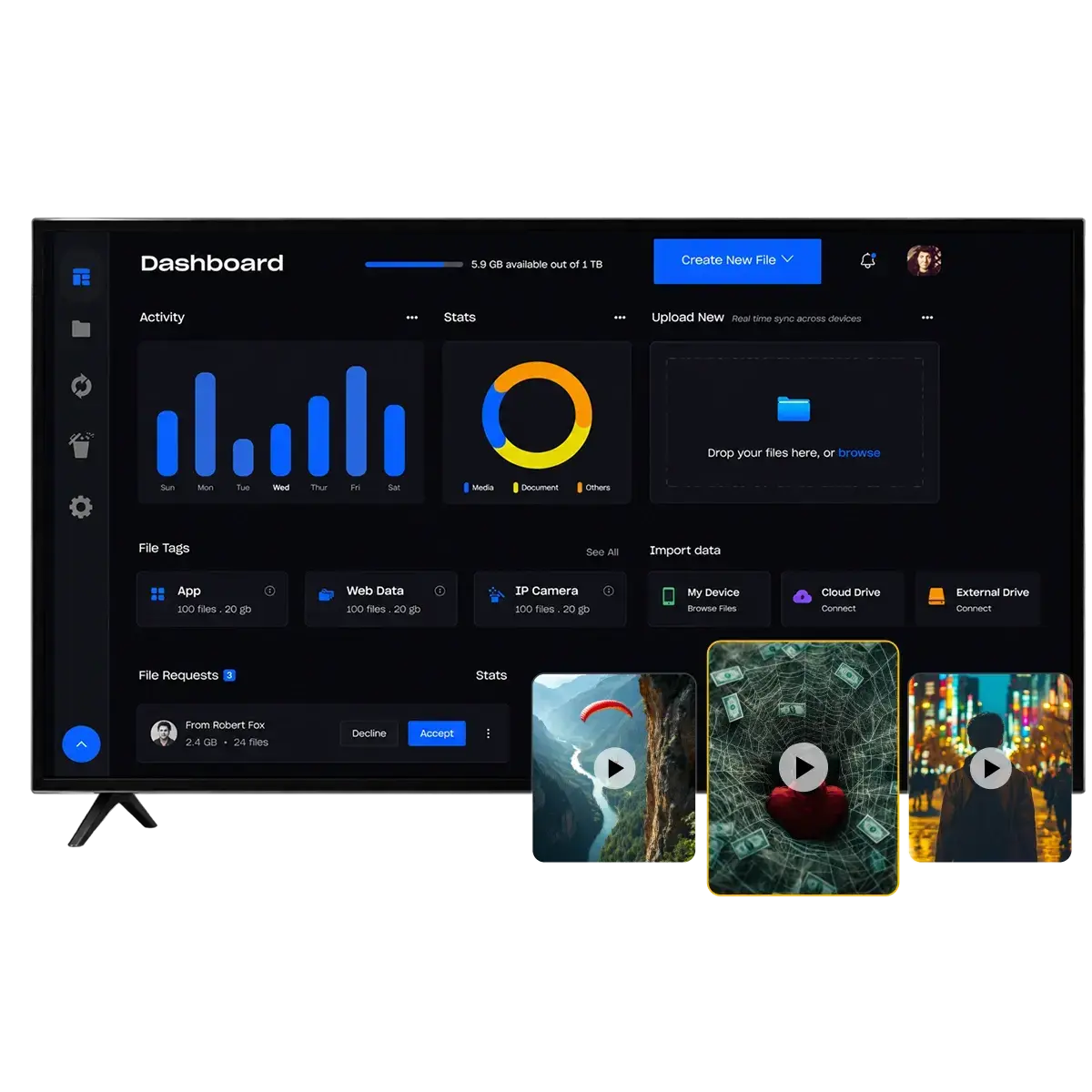
A streaming CMS (or video CMS) is where your video library is managed: ingest, metadata, captions, transcoding, scheduling and publishing. Enveu's video CMS handles VOD, live, FAST and audio in one place, applies multi-DRM at packaging, and publishes to apps on 15+ devices. It is powered by Content Manager inside Experience Cloud.






A streaming CMS — also called a video CMS — is the system of record for your video library. It is where content is ingested, described, transcoded, scheduled and pushed live, and it is the difference between a catalogue that is easy to grow and one that fights you at every release.
A general-purpose web CMS cannot do this: it has no concept of renditions, DRM packaging, content windows or device targets. Enveu's video CMS handles VOD, live, FAST channels and audio in one catalogue, with multilingual metadata, automatic transcoding, and scheduled publishing to every app you run. It is powered by Content Manager inside Experience Cloud.
Most teams come to a streaming CMS because the one they have is slowing them down — publishing takes too many steps, metadata lives in spreadsheets, or the CMS cannot handle live and FAST alongside VOD. Replacing it does not have to mean replacing the apps: the CMS sits behind your existing players and front end, so a migration moves the content and the workflow without touching what viewers see.
One system for the whole library
Drag-and-drop & bulk upload
Intuitive uploads, API ingest and batch library management.
Metadata & captions
Multilingual metadata, taxonomy, artwork and customisable captions.
Video transcoding
Automatic encoding into every rendition your devices need.
Content scheduling
Windowing, scheduled publishing and availability rules.
Live & on-demand
Manage VOD, live, FAST and audio from one catalogue.
Geo-blocking & branding
Regional licensing controls, plus branded player designs.
EPG & 24×7 channels
Build always-on linear channels with a full electronic programme guide (EPG).
External partner portal
Give content partners their own scoped login to upload and manage their catalogue.
Use-case taxonomy
Ready taxonomy for sports, entertainment and more — multilingual, and yours to extend.
Video CMS at a glance
How the video CMS works
Bulk upload, API ingest, or pull from existing storage and MAM.
Metadata, taxonomy, captions, thumbnails and multilingual data.
Automatic encoding into every rendition and format your devices need.
Set windows and availability, then publish to every app in one click.
Video CMS, module by module
Every capability above maps to a product you can see in a demo — not a feature list.
The video CMS: ingest, metadata, captions, transcoding, scheduling and DRM packaging.
Explore Content Manager →Control layouts, branding and merchandising across every app in real time — no app-store release.
Explore Experience Manager →Automates the media work — live-to-VOD, clips, subtitles and social publishing.
Explore Enveu Flow →Branded apps for web, mobile, Apple TV, Fire TV, Roku and smart TVs — 15+ platforms from one codebase.
Explore Apps →Experience Cloud + Enveu Flow
Launch and run it with Experience Cloud, automate the media work with Enveu Flow — use one, or both together.
- One catalogue for VOD, live, FAST and audio
- Multilingual metadata and taxonomy
- Automatic transcoding and DRM packaging
- Scheduled publishing to 15+ device platforms
- Auto-generate subtitles, translations and chapters
- Cut trailers and clips without an editor
- Turn live streams into catalogue-ready VOD
Video CMS by industry
Sports →
Live matches, replays and highlights.
Entertainment →
Series, films and originals.
Education →
Courses, live classes and cohorts.
Fitness →
Live and on-demand classes.
Religious →
Live services, teachings and archives.
Creators →
Fan memberships and pay-per-view.
Kids →
Safe, age-appropriate streaming.
Audio →
Podcasts, music and audio.
I wanted to create a platform that can accommodate more producers to publish and monetise their content easily; we take only a small cut, and they retain their rights.
 Tony SaabFounder & CEO, Tesliya
A huge shoutout to team Enveu for helping us with our every need and making our vision a reality.
 Alexandru MorarasDirector, Iberalia GO
Why teams choose Enveu for video cms
Swap the CMS, keep the apps
It sits behind your existing players and front end — a migration moves content and workflow, not the viewer experience.
Built for video, not pages
Renditions, DRM packaging, content windows and device targets — none of which a web CMS understands.
One catalogue, every format
VOD, live, FAST and audio in a single library, with multilingual metadata throughout.
Web CMS, legacy OTT CMS, or a streaming CMS
The failure mode is almost always the same: a system that manages pages being asked to manage video.
| Web CMS (e.g. WordPress) | Legacy OTT CMS | Enveu | |
|---|---|---|---|
| Built for | Pages | Video — but usually VOD only | VOD, live, FAST and audio |
| Transcoding & renditions | Plugin, or manual | Yes | Automatic, every format your devices need |
| DRM packaging | No | Often a separate integration | Applied at packaging, multi-DRM |
| Content windows & scheduling | No | Basic | Windowing, scheduling, regional rules |
| Multilingual metadata | Plugin territory | Sometimes | Native — metadata, artwork, captions |
| Replacing it later | Easy | Painful — apps are usually coupled to it | Sits behind your apps; swap without a rebuild |
WordPress plus a video plugin is perfectly adequate for a handful of videos on a website, and far cheaper. It breaks down at the point where renditions, DRM packaging, content windows and device targets start to matter — which is the point where you have a streaming business.
Go deeper on video content management
Every streaming term explained — from DRM and ABR to SVOD, AVOD and FAST.
Browse the glossary →Build vs. buy, native vs. hybrid, single vs. multi-CDN — the trade-offs, side by side.
Compare approaches →Quantify the hours and cost automating ingest, metadata and publishing gives back.
Calculate the ROI →How media companies launched and scaled on Enveu — and what it cost them.
Read the stories →Integrations that power this
Enveu connects the payment, video, DRM, and analytics tools your stack already uses — no rebuild required.
Run your library on Enveu.
Book a walkthrough of the video CMS with your own content model.