If you're building a video or audio app on Android, the player is the part users judge first — how fast it starts, whether it stalls, how it handles a flaky network. ExoPlayer is the library most serious Android apps reach for to get that right, and it's what powers playback in apps like YouTube. One important thing to know before you start, though: ExoPlayer has moved. The standalone com.google.android.exoplayer2 library is deprecated, and ExoPlayer now lives inside AndroidX Media3 — so a 2023 tutorial will have you importing packages that no longer receive updates. This guide covers what ExoPlayer is, what changed with Media3, and how to implement it correctly today.
ExoPlayer is Google's open-source media player for Android, now maintained as part of the AndroidX Media3 library. It plays audio and video with adaptive streaming (HLS, DASH, SmoothStreaming), DRM, subtitles and offline downloads, and is highly customizable — giving developers a far more capable alternative to Android's built-in MediaPlayer, which is why apps like YouTube rely on it.
What is ExoPlayer?
ExoPlayer is an application-level media player for Android, built on top of the platform's low-level media APIs but far easier to work with and much more capable. Unlike the built-in MediaPlayer, ExoPlayer is open source, updated frequently, and supports formats and features that MediaPlayer doesn't — most importantly adaptive streaming, where the video quality adjusts automatically to the viewer's bandwidth. It plays local files and progressive downloads, but its real strength is streaming: it's the reason a video can start at low quality on a weak connection and step up to HD as the network improves, without the user touching anything. Because it's a library rather than a black box, you can customize almost everything — the UI, the buffering rules, error handling, how it talks to your servers — which is exactly why large streaming apps use it instead of the OS player.
ExoPlayer vs Media3: what changed (and why it matters)
This is the single most important thing to get right in 2026. Google deprecated the standalone ExoPlayer library (com.google.android.exoplayer2) as of version 2.19, and all active development moved to AndroidX Media3, where ExoPlayer is now one module. Media3 is stable and current (version 1.10 as of early 2026), and it's where every new feature, bug fix and security update now lands. If you start a new project on the old library, you're building on frozen code. The migration is mostly mechanical — package renames and a few class renames — and the table below maps the pieces you'll see in older tutorials to their Media3 equivalents.
| Old ExoPlayer 2 (deprecated) | AndroidX Media3 (current) |
|---|---|
com.google.android.exoplayer2.* | androidx.media3.* |
SimpleExoPlayer | ExoPlayer (built via ExoPlayer.Builder) |
SimpleExoPlayerView / PlayerView | androidx.media3.ui.PlayerView |
ExoPlayerFactory.newSimpleInstance() | ExoPlayer.Builder(context).build() |
ExtractorMediaSource | MediaItem + ProgressiveMediaSource |
Gradle: com.google.android.exoplayer:exoplayer | Gradle: androidx.media3:media3-exoplayer |
Google ships an official migration script and mapping guide, but for a new build you simply start on Media3 from day one.
Why use ExoPlayer instead of Android's MediaPlayer?
| Capability | What it gives you |
|---|---|
| Adaptive streaming | Native support for HLS, DASH and SmoothStreaming, so quality tracks the network in real time |
| Wide format support | MP4, MKV, WebM, MP3, and streaming manifests via pluggable extractors and modules |
| DRM | Built-in Widevine (and PlayReady/ClearKey) for protecting premium content |
| Deep customization | Custom UI, buffering policy, track selection, caching and error handling |
| Frequent updates | Shipped as a library, not tied to the OS version — fixes reach every device fast |
| Extras | Subtitles, offline downloads, ad insertion, background playback and casting |
What formats and features does ExoPlayer support?
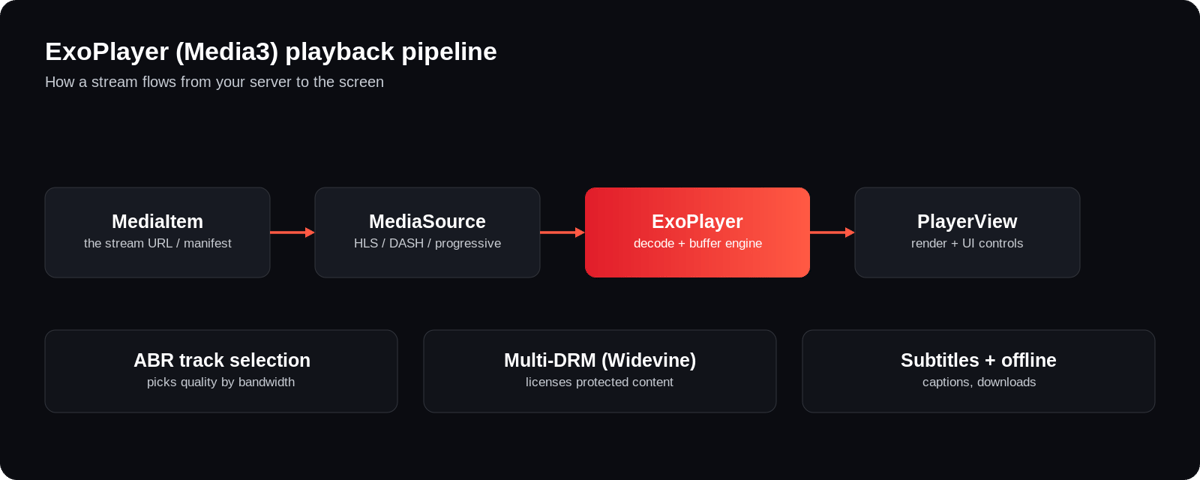
ExoPlayer handles the streaming formats that matter for real apps. For adaptive delivery it supports HLS (the dominant format for multi-device streaming), MPEG-DASH and SmoothStreaming; for progressive playback it reads MP4, MKV, WebM, MP3, AAC and more. On the protection side it integrates Widevine DRM so licensed content stays encrypted end to end. It renders subtitles and captions (WebVTT, TTML, CEA-608/708), supports offline downloads for watch-later, and can insert ads. Crucially, these arrive as modular dependencies — you add media3-exoplayer-hls only if you need HLS — so your app stays lean. If your streams use modern codecs like HEVC or AV1, ExoPlayer plays them wherever the device's hardware decoder allows.
How to implement ExoPlayer in Android (Media3)
Here's a minimal, current implementation. It uses Kotlin and the Media3 packages — the same steps work in Java with the equivalent syntax.
Step 1 — Add the Media3 dependencies to your module's build.gradle (use the latest stable version):
implementation "androidx.media3:media3-exoplayer:1.10.0"
implementation "androidx.media3:media3-ui:1.10.0"
implementation "androidx.media3:media3-exoplayer-hls:1.10.0" // only if you stream HLS
Step 2 — Add internet permission in AndroidManifest.xml:
<uses-permission android:name="android.permission.INTERNET" />Step 3 — Add a PlayerView to your layout:
<androidx.media3.ui.PlayerView
    android:id="@+id/playerView"
    android:layout_width="match_parent"
    android:layout_height="250dp" />
Step 4 — Build the player and load a video in your Activity:
val player = ExoPlayer.Builder(this).build()
playerView.player = player

val mediaItem = MediaItem.fromUri("https://example.com/master.m3u8")
player.setMediaItem(mediaItem)
player.prepare()
player.playWhenReady = true
That's a working adaptive-streaming player. Remember to release the player (player.release()) in onStop()/onDestroy() so you don't leak resources — a common beginner mistake that drains battery and holds decoders open.
How do you customize ExoPlayer's UI and controls?
Out of the box, PlayerView renders the video plus a standard control bar — play/pause, a seek bar, fast-forward and rewind. You can tune it with attributes like use_controller, hide_on_touch, auto_show, resize_mode (fit, fill, fixed width/height) and surface_type. For anything beyond that — a branded control bar, custom buttons, a different layout — you supply your own layout via app:controller_layout_id, reusing ExoPlayer's control IDs so the behaviour still works. This is how streaming apps get a player that looks like their product rather than a default Android control bar, and it's one of the main reasons teams choose ExoPlayer over the built-in player.
How does adaptive bitrate streaming work in ExoPlayer?
Adaptive bitrate (ABR) streaming is ExoPlayer's headline capability. The same video is encoded at several qualities — each a "track" defined by its bitrate and resolution — and split into short segments of a few seconds. ExoPlayer's default track selector continuously measures available bandwidth and picks the highest quality the connection can sustain, switching mid-stream at segment boundaries. On a weak connection it drops to a lower bitrate to avoid buffering; as the network recovers it steps back up. With HLS or DASH sources this happens automatically once you point a MediaItem at the manifest — you don't hand-code the logic. Getting this right end to end also depends on how your content is ingested and delivered upstream, not just the player.
Does TikTok or YouTube use ExoPlayer?
YouTube and other Google apps use ExoPlayer, and it's widely adopted across major Android streaming apps because it gives teams the control and performance a default player can't. Many short-video and social apps build their Android playback on ExoPlayer/Media3 too, then heavily customize buffering and pre-loading for a fast, swipe-to-next feel. The takeaway: if the biggest video apps standardize on it, it's a safe, well-supported foundation for yours. For the wider landscape — including consumer player apps — see the best Android video players.
ExoPlayer for OTT and Android TV apps
ExoPlayer is only the playback layer. A production OTT app needs much more around it: encoding and packaging into HLS/DASH, a codec and ABR ladder, a CDN for global delivery, multi-DRM licensing, subtitles, offline downloads, analytics — and then the same experience rebuilt for Android TV, Fire TV, Apple TV, iOS and the web. Wiring all of that up yourself, per platform, is a long engineering programme. Enveu's Android & Android TV apps — part of Enveu's apps for 15+ platforms — ship with adaptive playback, multi-DRM, offline viewing and a full OTT back end already built and maintained, so you're not maintaining a player stack and a dozen device apps on top of your actual product. ExoPlayer is a great choice if you're building the player yourself; if you'd rather ship the whole app, that groundwork is done.