"Best Android video player" means two very different things depending on who's asking. If you want to watch video on your phone or TV, you're after an app that plays any file you throw at it. If you're building a streaming app, you're after a playback engine — an SDK — that handles adaptive streaming, DRM and analytics at scale. This guide covers both: the best Android video player apps in 2026, and the best player technologies for building an OTT app. Pick the section that matches what you're trying to do.
The best Android video players in 2026 depend on your goal. To watch video, VLC and MX Player lead for playing virtually any format, with Kodi for a full media centre. To build an OTT streaming app, ExoPlayer — now part of AndroidX Media3 — is the standard playback engine, offering adaptive streaming, DRM and deep customization that consumer apps can't provide.
What makes a good Android video player?
Whether it's an app or an SDK, a strong Android video player shares the same fundamentals: broad format support (so it plays MP4, MKV, HEVC, AV1 and more without extra downloads), smooth playback with efficient hardware-accelerated decoding, adaptive streaming so quality tracks the network, playback controls (subtitles, picture-in-picture, speed, resume), and multi-device support across phones, tablets and TVs. For streaming apps specifically, add DRM for protected content, analytics for engagement data, and monetization hooks for ads and subscriptions. The consumer apps below nail the first set; the SDKs further down add the second.
Best Android video player apps in 2026 (for watching)
If you just want to play video files and streams on an Android phone, tablet or TV, these are the standouts.
| App | Best for | Why it stands out |
|---|---|---|
| VLC for Android | Playing anything, free | Handles nearly every codec and container (HEVC, AV1, VP9, MKV) with no plugins, no ads; excellent Android TV build |
| MX Player | Most popular all-rounder | Smooth 4K/8K playback, gesture controls, subtitle support; huge user base |
| Kodi | A full media centre | Library management, artwork and add-ons for organising a large local collection |
| Plex | Streaming your own library | Serves your media to any device with a polished, Netflix-style interface |
| Nova Video Player | Android TV & home theatre | Strong format and audio passthrough support, built for the big screen |
For most people, VLC is the safe default — it's free, ad-free, and plays essentially everything. MX Player is the popular alternative with a slicker touch UI, and Kodi or Plex make more sense if you're organising and streaming a personal library rather than opening one-off files.
Best video player for Android TV
On the big screen the priorities shift to remote-friendly navigation, high-bitrate and HDR playback, and audio passthrough. VLC for Android TV is again the strongest free all-rounder — it plays virtually any format with a proper 10-foot interface. Kodi and Plex suit anyone wanting a library experience with artwork and metadata, and Nova Video Player is purpose-built for Android TV boxes and home-theatre setups. The same file-format strengths that make these great on a phone matter even more on a TV, where you're more likely to hit high-resolution HEVC or large MKV files.
Are the best Android video players free?
Mostly, yes. VLC is completely free, ad-free and open source — which is why it's the top pick for anyone who just wants a player that works without upsells, and the best ad-free video player on Android in 2026. MX Player is free with ads, with an ad-free "Pro" version for a one-off fee. Kodi is free and open source, while Plex has a free tier with optional paid features for advanced streaming and DVR. In short, you don't need to pay for excellent Android playback — the paid options mostly add convenience (ad removal, library management, remote streaming) rather than better core playback. That's a real advantage of the open ecosystem: the strongest general-purpose player, VLC, costs nothing and carries no ads.
Which streaming app is best optimized for Android?
For playing your own files, VLC and MX Player are the most optimised — they use hardware-accelerated decoding to play high-resolution video smoothly while sipping battery. For streaming services, the "best optimized" experience comes from apps built on ExoPlayer/Media3, because that engine is tuned specifically for Android's decoders, adaptive streaming and background playback. It's why the major streaming apps standardise on it: a player built natively for Android consistently beats a generic or web-wrapped one on start time, smoothness and battery use. So if you're judging how well a given streaming app runs on Android, its underlying player technology is usually the deciding factor — a well-built native player is the difference between instant, buffer-free playback and a sluggish experience.
Building an OTT app? The best Android player SDKs
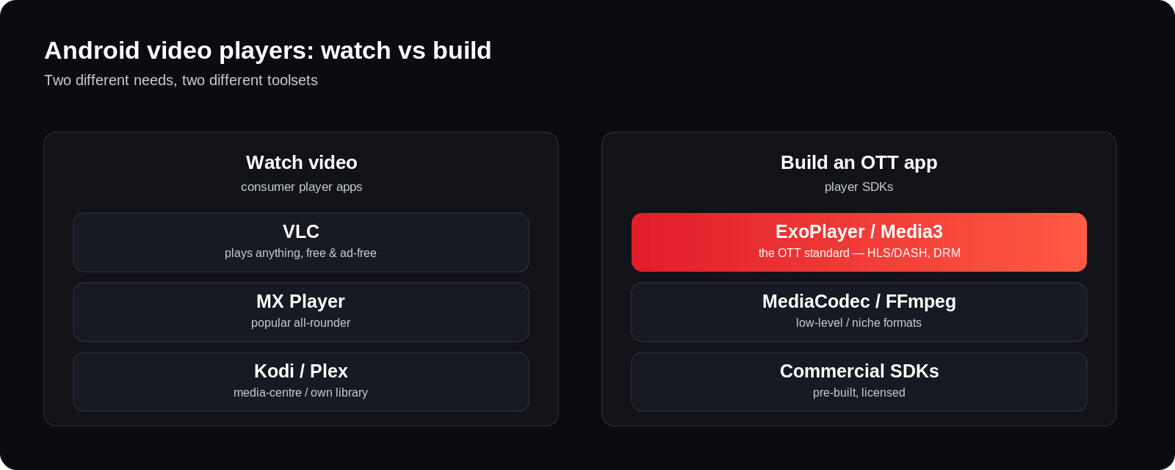
Consumer apps play files; they don't help you build a streaming service. For that you need a developer-grade player SDK that integrates adaptive streaming, DRM, ads, subscriptions and analytics. Here are the options OTT teams actually choose.
| Technology | What it is | Best for |
|---|---|---|
| ExoPlayer / Media3 | Google's open-source player, now part of AndroidX Media3 | The default for most OTT apps — HLS/DASH, Widevine DRM, ABR, deep customization |
| Custom player on ExoPlayer | ExoPlayer core with proprietary UI, DRM and ad logic | Large platforms with dedicated engineering that need full control |
| Android MediaCodec | The low-level native decoding API | Specialised, hardware-optimised cases; too raw for most apps alone |
| FFmpeg-based players | FFmpeg integrated for broad codec support | Niche formats and custom pipelines; heavy to integrate and maintain |
| Commercial player SDKs | Licensed SDKs with playback, DRM and ads pre-built | Faster deployment, at the cost of licensing fees and lock-in |
ExoPlayer and Media3: the OTT standard
For building streaming apps, ExoPlayer is the near-universal choice — it powers playback in YouTube and countless commercial OTT apps. It natively supports HLS and DASH adaptive streaming, integrates Widevine DRM, handles subtitles and offline downloads, and lets you customize the UI and buffering completely. One essential thing to know in 2026: ExoPlayer has moved into AndroidX Media3, and the old standalone com.google.android.exoplayer2 library is deprecated — so new builds should start on Media3. We cover the migration and a working implementation in our full guide to ExoPlayer and how to implement it in Android.
What an OTT-grade player really needs
A player library is only the beginning. A production OTT app needs the player plus everything around it: adaptive bitrate streaming for every network, multi-DRM to license premium content, analytics and event tracking to understand engagement, monetization compatibility across SVOD, AVOD and FAST, and a consistent experience across phones, tablets and TVs. Then that whole stack has to be rebuilt and maintained for each platform — Android, Android TV, iOS, Fire TV, Apple TV and the web. That maintenance burden, not the player itself, is what makes building OTT apps in-house expensive.
Consumer app or build your own — which do you need?
The decision is simple once you know your goal. If you want to watch video, pick a consumer app — VLC for anything, MX Player for a slicker feel, Kodi or Plex for a library. If you want to ship a branded streaming service, you need a player SDK like ExoPlayer/Media3 embedded in a full OTT platform. That's where Enveu's apps come in: they ship your branded app to 15+ platforms — including Android and Android TV — with adaptive playback, multi-DRM, offline downloads, analytics and monetization already integrated and maintained. You get production-grade Android playback without assembling a player stack and a dozen device apps yourself — part of a white-label platform that's yours end to end.