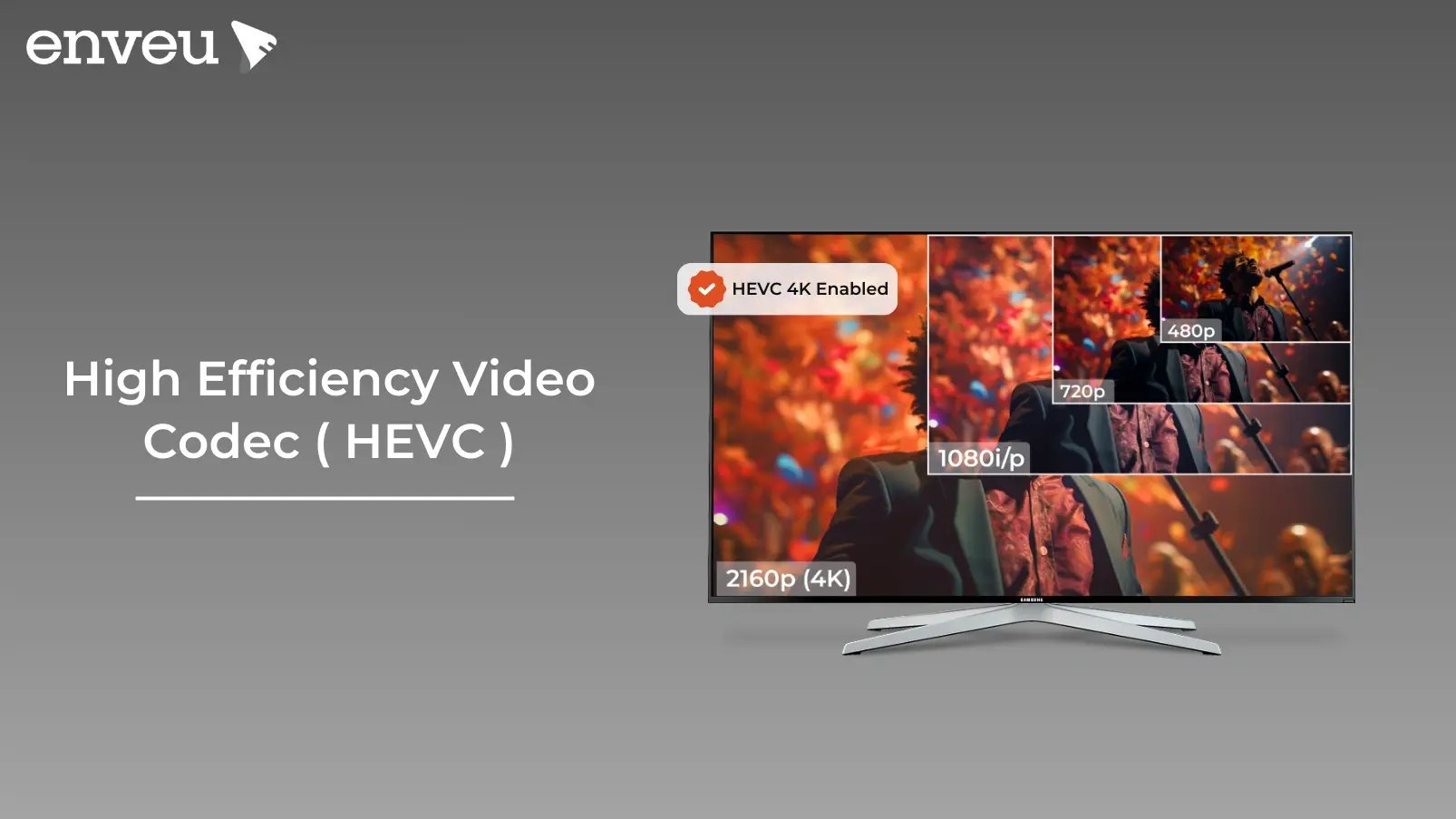
If you stream in 4K, watch HDR on your phone, or store video without filling a drive in a week, you're almost certainly relying on HEVC. It's the compression standard that made high-resolution video practical to deliver over ordinary internet connections — and understanding it helps you make smarter choices about quality, bandwidth and cost. On Android, a media player such as ExoPlayer decodes HEVC wherever the device's hardware supports it.
What is HEVC? HEVC stands for High Efficiency Video Coding, also known as H.265 or MPEG-H Part 2. It's a video compression standard that shrinks file sizes by up to 50% compared with H.264 at the same visual quality, and supports resolutions up to 8K plus HDR. That efficiency is why streaming services, broadcasters and device makers adopted it for high-resolution video.
What is HEVC? (H.265 full form and meaning)
HEVC is the successor to H.264/AVC, the codec that powered most online video for a decade. Its full form — High Efficiency Video Coding — describes exactly what it does: encode the same video at roughly half the bitrate without a visible drop in quality. In plain terms, a 4K movie that would need a huge file under H.264 fits in about half the space under HEVC, so it streams smoothly on connections that couldn't handle the older format. HEVC handles everything from SD and HD up to 4K UHD and 8K UHD, which is why it became the backbone of modern high-resolution delivery.
How does HEVC work?
HEVC squeezes files smaller by being smarter about which parts of a frame actually need data. A handful of techniques do the heavy lifting:
- Coding Tree Units (CTUs). HEVC divides each frame into flexible blocks up to 64×64 pixels — far larger than H.264's 16×16 macroblocks. Big blocks cover simple areas efficiently; small ones preserve fine detail where it matters.
- Motion compensation. The encoder predicts how objects move between frames using variable block sizes, so it stores the change rather than repeating whole frames.
- Intra prediction. Within a single frame, HEVC predicts pixels from their neighbours, removing redundant data.
- CABAC entropy coding. Context-Adaptive Binary Arithmetic Coding packs the remaining data into fewer bits, raising quality per byte.
- Parallel processing (tiles, slices, WPP). The frame is split into independent regions encoded at the same time, speeding up processing without hurting quality.
- Loop filtering. A final pass smooths out blocking and artefacts for a cleaner picture.
Key benefits of HEVC
The efficiency gain cascades into several practical wins:
- Smaller files, same quality. Up to 50% smaller than H.264 means faster downloads and cheaper storage.
- Lower bandwidth streaming. Providers deliver crisp video at lower bitrates, so playback holds up on slower connections with less buffering.
- HDR and wide colour. HEVC supports HDR10 and Dolby Vision for richer colour, contrast and brightness.
- 4K and 8K ready. It was built for ultra-high-definition, making it future-proof for modern displays.
- Broad device support. Smartphones, smart TVs, consoles and streaming sticks with the right chipset decode HEVC natively.
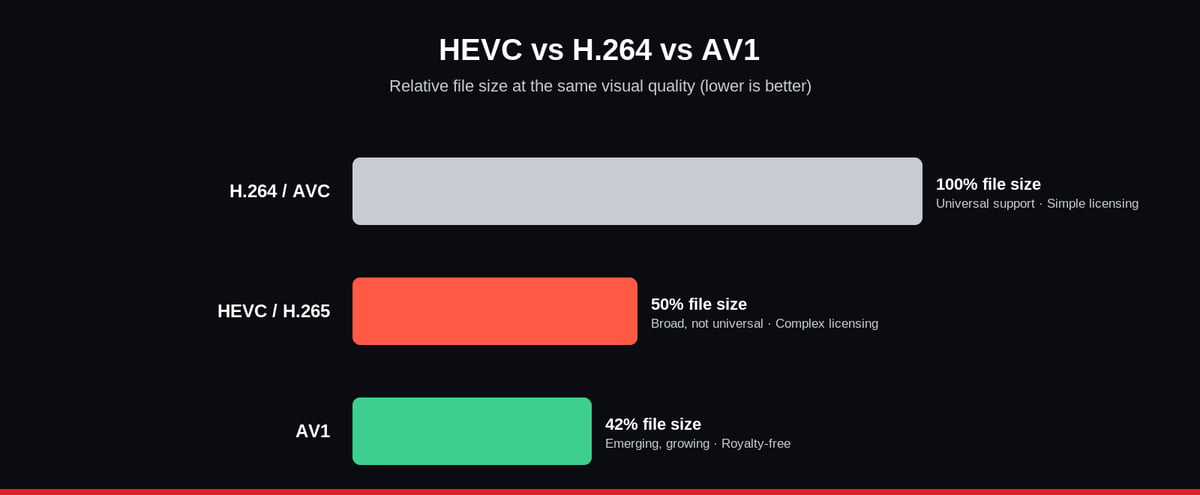
HEVC vs H.264 vs AV1
HEVC isn't the only modern codec. Here's how the three that matter compare:
| Codec | Compression efficiency | Licensing | Device compatibility |
|---|---|---|---|
| H.264 (AVC) | Baseline | Simple, well-established | Universal |
| HEVC (H.265) | ~50% better than H.264 | Complex (multiple patent pools) | Broad, but not universal |
| AV1 | Better than HEVC | Royalty-free (open) | Emerging, growing fast |
For a deeper look at the royalty-free options, see our comparison of VP9 vs AV1 — the two codecs most often weighed against HEVC when licensing cost is a concern.
Challenges and limitations of HEVC
HEVC's efficiency comes with real trade-offs worth knowing before you commit:
- Licensing complexity. Unlike H.264's straightforward terms, HEVC's patents are split across multiple pools, so streaming, broadcast and device businesses face a fragmented, sometimes costly royalty picture. This has slowed adoption on cost-sensitive platforms.
- Higher compute demands. Encoding and decoding HEVC needs more processing power than H.264, so older or low-end devices without dedicated hardware decoding can struggle.
- Patchy browser support. Web browsers historically lacked broad HEVC support, so many web-based streaming services still fall back to H.264 or AV1 for playback in the browser.
- Royalty-free rivals. Google's VP9 (used by YouTube) and the open AV1 (backed by Netflix, Apple and others) offer comparable or better compression with no licensing fees, making them attractive alternatives.
What file formats and extensions use HEVC?
HEVC is a codec, not a file type — it lives inside container formats. You'll most often find HEVC-encoded video in .mp4 and .mov files (Apple records iPhone video as HEVC in .mov by default), as well as .mkv and .ts streams. The same compression also powers HEIF/HEIC images — the efficient photo format on modern phones. Because HEVC decoding isn't built into every operating system by default, Windows users sometimes need the "HEVC Video Extensions" add-on to play these files, and some browsers still can't decode HEVC at all. That gap between "encoded in HEVC" and "plays everywhere" is exactly why streaming platforms keep an H.264 or AV1 fallback alongside it.
Is HEVC good for live streaming?
Yes — HEVC is well suited to live streaming because it delivers high-quality video at lower bitrates, which keeps bandwidth costs down and reduces buffering for viewers. The caveats are hardware and latency: real-time HEVC encoding is compute-heavy, so you need a capable codec-accelerated encoder, and playback depends on the viewer's device supporting HEVC decoding. For live sports or events streamed to modern TVs and phones, HEVC is excellent; for broad web reach, providers often pair it with an H.264 fallback so no viewer is locked out.
Should you use HEVC for your content?
HEVC is a strong choice if you're delivering high-resolution or HDR video and your target devices support it — the bandwidth and storage savings are real. Weigh it against three things: licensing cost, the processing power your encoders and viewers' devices have, and where your content plays (native apps handle HEVC well; browsers may not). If budget or broad web compatibility is the priority, AV1 is worth serious consideration.
How do you encode and play HEVC video?
To create HEVC video you need an HEVC encoder — most modern hardware encoders and software tools (FFmpeg, HandBrake, and the encoders built into professional streaming platforms) can output H.265. Because HEVC encoding is compute-intensive, dedicated hardware acceleration (on modern GPUs and mobile chips) makes it far faster than software-only encoding. On the playback side, most current phones, smart TVs, consoles and streaming sticks decode HEVC natively; the weak spots are older devices and some desktop browsers, which is why a well-built streaming service always keeps a fallback rendition. For a business, the practical answer is to let your platform's transcoding pipeline handle HEVC encoding and fallbacks automatically rather than managing encoders by hand.
HEVC in a streaming workflow
In practice you rarely ship a single codec. A modern OTT pipeline transcodes each source into an adaptive bitrate ladder — often HEVC for capable devices and H.264 or AV1 as fallbacks — so every viewer gets the best quality their device and connection can handle across SD through 8K resolutions. Enveu's Content Manager handles adaptive-bitrate transcoding up to 4K and delivers to 15+ device platforms from one back end, so you configure the codec and rendition strategy instead of building the encoding stack yourself. Used well, HEVC isn't about keeping up — it's about delivering sharper video at lower delivery cost.
Written by Shalabh Agarwal, Enveu.