MKV and MP4 are both container formats — they hold video, audio and subtitles — but MP4 is the near-universal standard for streaming and devices, while MKV is more flexible and popular for high-quality local files with multiple audio and subtitle tracks. Quality is identical if the video inside is encoded the same way; the real difference is compatibility and features. Use MP4 to stream, share and play anywhere; use MKV to bundle many tracks or archive high-quality video.
MKV vs MP4 at a glance
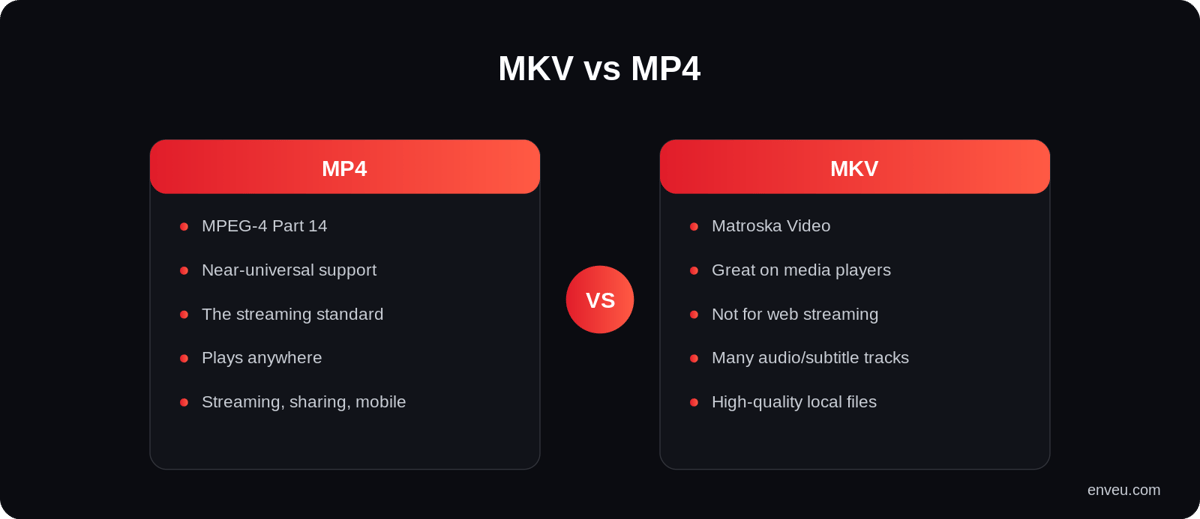
| MP4 | MKV | |
|---|---|---|
| Full form | MPEG-4 Part 14 | Matroska Video |
| Compatibility | Near-universal — devices, browsers, apps | Great on computers/media players; patchy elsewhere |
| Streaming | The standard (works with HLS/DASH) | Not natively used for web streaming |
| Multiple tracks | Supported, more limited | Excellent — many audio/subtitle tracks + chapters |
| File size | Slightly smaller (leaner overhead) | Slightly larger (more metadata/tracks) |
| Best for | Streaming, sharing, mobile, playing anywhere | High-quality local files, archiving, multi-track |
What is a video container (and why it's not the codec)
First, the thing that trips everyone up: a container like MKV or MP4 is a wrapper, not the compression. Inside it sits the actual video codec (H.264, HEVC, AV1…), one or more audio tracks, and often subtitles and chapters. The container decides how those pieces are packaged and what a player needs to open them; the codec decides how the video is compressed and how it looks. That's why "MKV vs MP4" is really a question about packaging and compatibility, not picture quality.
What is MP4?
MP4 (MPEG-4 Part 14) is the most widely supported video container in the world. Practically every phone, browser, smart TV and app plays MP4, and it's the format streaming pipelines are built around. If you want a file that "just works" everywhere and streams cleanly, MP4 is the safe default — which is exactly why it dominates online video. The player you use matters too; see the best Android video players for apps and SDKs.
What is MKV? (MKV meaning & full form)
MKV stands for Matroska Video — an open, flexible container that can hold almost any codec plus many audio tracks, subtitle tracks and chapters in one file. That flexibility makes it a favourite for high-quality movie rips, anime (multiple languages/subs), and archiving. The trade-off is compatibility: not every device, TV or web player handles MKV natively, so files sometimes need converting before they'll play on a phone or in a browser.
Is MKV or MP4 better quality?
Neither is inherently higher quality — the container doesn't change the video. If the same footage is encoded with the same codec and bitrate, an MKV and an MP4 look pixel-for-pixel identical. Any "quality" difference people notice comes from the bitrate and codec inside the file, not the wrapper. MKV's advantage is that it makes it easy to carry very high-bitrate video alongside lots of extra tracks; MP4's advantage is that it plays that video everywhere.
Which is better, MKV or MP4? (which to use)
- Streaming or sharing — MP4. It plays everywhere and works with adaptive streaming (HLS/DASH).
- Local high-quality library / archiving — MKV, especially if you need multiple audio or subtitle tracks and chapters.
- Uploading to a platform — either works; it'll be transcoded to streaming-friendly formats anyway.
- Editing — MP4 is more broadly supported by editors; some need MKV converted first.
Short version: MP4 for compatibility and streaming, MKV for flexible high-quality storage. There's no universal winner — it depends on whether the file needs to travel or to be archived. A useful rule of thumb: if the file is going out — to a viewer, a phone, a website, a social platform — reach for MP4; if it's staying in — your archive, your media server, a multi-language master — MKV's flexibility pays off. And because converting between them is quick and lossless, you're never locked in: keep the MKV master and export MP4 copies whenever you need to share.
MKV vs MP4 file size
For the same video and audio, MKV and MP4 are very close in size — usually within a few percent. MP4 carries slightly leaner overhead, so it can be marginally smaller, while MKV's extra flexibility (multiple tracks, chapters, richer metadata) can add a little. But the container is not what determines file size — the codec, bitrate and resolution of the video inside are. A 4K HEVC file is large whether it's wrapped as MKV or MP4; a compressed 1080p H.264 file is small in either. If you're trying to shrink a file, change the encoding, not the container.
Why don't streaming platforms use MKV?
Web and app streaming is built on MP4-based delivery — the video is segmented and served as HLS or DASH, both of which use MP4-style (fragmented MP4) packaging that every browser and device understands. MKV isn't natively supported by the browser video stack or by most streaming players, so services don't stream it. You can happily upload an MKV source to a video platform, but it gets transcoded into MP4/HLS/DASH before it reaches viewers. In other words, MKV is a great source and archive format, not a delivery format.
Why won't my MKV file play?
If an MKV won't play, it's almost always one of two things: the device/player doesn't support the MKV container (common on iPhones, Safari and some TVs), or it doesn't support the codec inside it (an older device may not decode HEVC or a particular audio track). The fix is usually to play it in a capable player like VLC, or to convert/remux it to MP4 with a widely supported codec. Because remuxing to MP4 is lossless and fast, that's the go-to fix for "MKV won't play on my phone/TV."
Which devices and players support MKV?
On computers, MKV plays effortlessly in players like VLC and most media software. On TVs, phones and browsers support is more mixed: many modern smart TVs and Android devices play MKV, but iOS, Safari and some older or budget devices don't reliably — which is the usual reason an MKV "won't play." MP4, by contrast, is a near-guaranteed play on any of them. If you're sending a file to someone and don't know their setup, MP4 is the low-risk choice.
How to convert MKV to MP4 (and vice-versa)
Because both are containers, converting between them is usually fast and lossless — a tool like HandBrake or ffmpeg can "remux" the same video and audio streams into the other wrapper without re-encoding, so there's no quality loss and it takes seconds. (You only lose quality if you also re-encode the video, which isn't necessary just to change container.) The common move is MKV → MP4 to make a high-quality file playable on a phone or in a browser, keeping the main audio track and a subtitle track.
MKV vs MP4 vs AVI, MOV and WMV
| Container | Strength | Best for |
|---|---|---|
| MP4 | Universal support, streams well | Streaming, sharing, mobile |
| MKV | Flexible, many tracks/chapters | Hi-quality local + archiving |
| MOV | Apple/editing ecosystem | Editing, macOS/iOS workflows |
| AVI | Old, very compatible but dated | Legacy files |
| WMV | Windows-oriented, smaller files | Older Windows/media use |
For anything you plan to publish online, they all funnel to the same place — a streaming-ready MP4/HLS/DASH output.
Delivering video in the right format
For streaming, the container question is handled for you: you upload your source (MP4, MKV or otherwise) and a platform transcodes it into adaptive, streaming-ready formats for every device. Enveu's Content Manager ingests your files and packages them as adaptive bitrate (HLS/DASH) up to 4K, so viewers always get a compatible stream regardless of the source container. See also streaming resolutions and what M3U8 files are.