Set your audio bitrate too low and voices sound muffled and music turns to mush; set it too high and you waste bandwidth and storage for quality no one can hear. This guide covers exactly what audio bitrate is, how it affects sound, the bitrate to use for podcasts, music and hi-fi, and the codecs and factors that change the answer.
Audio bitrate is the amount of data used per second of audio, measured in kilobits per second (kbps) — higher bitrate generally means better sound quality but a larger file and more bandwidth. For streaming, ~128 kbps is fine for casual listening and podcasts, ~256–320 kbps is high quality for music, and lossless formats run much higher. The right bitrate depends on the content (voice vs music), the codec, and how it's delivered.
What is audio bitrate?
Bitrate describes how much audio data is transmitted or stored each second. A 128 kbps stream sends 128 kilobits of data per second; a 320 kbps stream sends more than twice as much, capturing more detail. More bitrate can mean better fidelity — but only up to the point your source recording, codec and the listener's ears can actually distinguish. Past that point, extra bitrate just inflates file size and bandwidth for no audible gain.
How audio bitrate affects quality
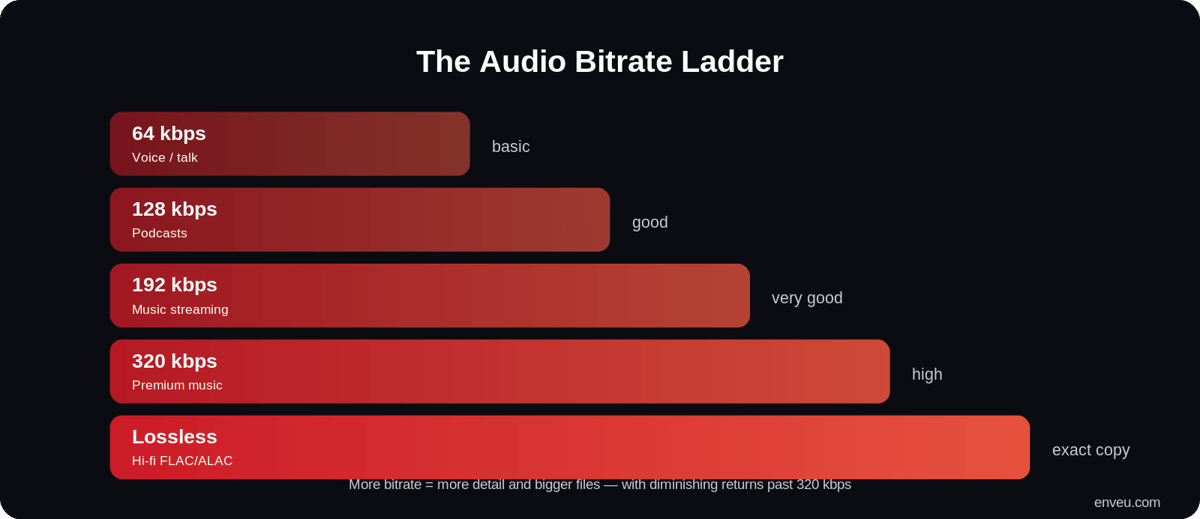
| Bitrate | Quality | Best for |
|---|---|---|
| ~64 kbps | Basic | Voice, talk radio, low-bandwidth |
| ~128 kbps | Good | Podcasts, casual music |
| ~192 kbps | Very good | General music streaming |
| ~256–320 kbps | High | Premium music streaming |
| ~800–1,400 kbps | Lossless | Hi-fi (FLAC/ALAC) |
The jump from 64 to 192 kbps is night and day; the jump from 320 kbps to lossless is subtle and only audible on good equipment with a trained ear. That's the diminishing-returns curve of audio bitrate in one line.
Constant vs variable vs lossless bitrate
How the bitrate is allocated matters as much as the number:
| Type | How it works | Best for |
|---|---|---|
| CBR (constant) | Same bitrate throughout the file | Live streaming, predictable delivery |
| VBR (variable) | Bitrate rises for complex passages, drops for simple ones | On-demand files — better quality per MB |
| Lossless | No data discarded; exact copy of the source | Hi-fi, archiving, mastering |
For live audio, CBR keeps delivery stable. For downloadable or on-demand files, VBR gives better quality for the same average size. Lossless (FLAC/ALAC) is for audiophile tiers where fidelity matters more than file size.
What bitrate should you use?
- Voice & podcasts — ~64–128 kbps is plenty; efficient codecs like Opus sound clean even at low bitrates.
- Music streaming — ~192–320 kbps (AAC) balances quality and bandwidth for most listeners.
- Hi-fi / audiophile — lossless (FLAC/ALAC), if your audience and delivery support it.
- Voice calls / low-data — ~24–48 kbps with Opus stays intelligible on weak connections.
Audio formats and their typical bitrates
The container and codec set what bitrates make sense. MP3 is universal and usually runs 128–320 kbps. AAC sounds better than MP3 at the same bitrate and is the streaming default. Opus is the most efficient for voice and low bitrates. FLAC/ALAC are lossless for hi-fi. If you're weighing lossless vs compressed at the file level, see WAV vs MP3.
Factors that change the right bitrate
- Type of content — dense music needs more bitrate than a single voice.
- Codec efficiency — a good codec (AAC, Opus) sounds better at a lower bitrate than an old one (MP3).
- Storage & bandwidth — higher bitrate multiplies across a big catalog and every stream you serve.
- Playback devices — phone speakers can't reveal what good headphones or a hi-fi system can.
- Purpose of use — casual background listening vs critical/mastering work have very different needs.
Audio bitrate vs video bitrate
In a video stream, the audio bitrate is a small slice of the total — but it still counts. When you plan a streaming bitrate, add the audio track (typically 128–160 kbps AAC) on top of the video figure so the combined stream fits the viewer's connection. Skimping on audio to save a little bandwidth is usually a false economy — poor sound is more noticeable than a slightly softer picture.
Bitrate vs sample rate vs bit depth
Three specs get confused, and they're not the same thing. Bitrate (kbps) is how much data per second the compressed file uses — the headline figure for streaming quality and bandwidth. Sample rate (kHz, e.g. 44.1 or 48 kHz) is how many times per second the audio was measured when recorded — it sets the range of frequencies captured. Bit depth (e.g. 16-bit or 24-bit) is the precision of each sample — it affects dynamic range and noise floor. Sample rate and bit depth describe the source recording; bitrate describes the delivered compressed stream. For streaming, you mostly tune bitrate; 44.1/48 kHz at 16-bit is standard for the source.
How much data does audio bitrate use?
Do the maths and it adds up fast at scale. A 128 kbps stream uses roughly 0.9 MB per minute (~57 MB/hour); 320 kbps is about 2.4 MB per minute (~140 MB/hour); lossless can be 300–600 MB/hour. For one listener that's trivial, but multiply by a large catalog and thousands of concurrent streams and the bitrate you pick directly drives your storage and bandwidth bill — which is exactly why adaptive delivery and efficient codecs matter. It matters to listeners too: a subscriber on a capped mobile plan will burn through their data far faster on a lossless tier than on a 128 kbps stream, which is why most services offer a "data saver" option that simply drops the bitrate.
Recommended audio bitrate by use case
| Use case | Codec | Recommended bitrate |
|---|---|---|
| Spoken-word podcast | MP3 / AAC | 96–128 kbps |
| Podcast with music/effects | AAC | 128–192 kbps |
| Music streaming (standard) | AAC | 192–256 kbps |
| Music streaming (premium) | AAC | 256–320 kbps |
| Audiophile / hi-fi | FLAC/ALAC | Lossless (~800–1,400 kbps) |
| Audio inside video | AAC | 128–160 kbps |
How to choose the right audio bitrate
- Start with the content — voice needs far less than music.
- Pick an efficient codec — AAC or Opus over MP3, so you get more quality per kbps.
- Match the delivery — CBR for live, VBR for downloads/on-demand.
- Test on real devices — check on phone speakers and headphones, not just studio monitors.
- Offer a ladder — serve multiple bitrates and let the player adapt to each listener.
Common audio bitrate mistakes
- Over-encoding voice — a 320 kbps podcast of one person talking wastes bandwidth for no benefit.
- Under-encoding music — 96 kbps music sounds thin and swirly; give it at least 192 kbps.
- Up-converting — exporting a low-bitrate MP3 to a high bitrate or lossless adds no quality; the data is already gone.
- Ignoring the codec — chasing a big MP3 bitrate when a smaller AAC file would sound better.
- One bitrate for everyone — no adaptive ladder means buffering for slow connections and wasted data for fast ones.
Deliver audio at the right bitrate with adaptive streaming
As with video, the professional approach is adaptive streaming: encode more than one bitrate and let each listener's player pick based on their connection — high fidelity on Wi-Fi, a lighter stream on mobile data, no interruptions. See how this works alongside video in our streaming resolutions guide and what audio streaming is.
Launching a music streaming service (or a podcast or audio service) means encoding at sensible bitrates, delivering adaptively, and handling a large catalog across devices. On Enveu's audio streaming software you can launch a full audio or podcast streaming app with adaptive delivery, offline downloads and large-catalog handling — part of Experience Cloud.