Every video you stream, call you make and page you load travels over one of two transport protocols: TCP or UDP. They solve the same problem — moving data across a network — in opposite ways, and picking the wrong one shows up as buffering, lag or dropped frames. This guide explains what separates them, the real advantage of UDP over TCP, when to use each, and which one wins for video streaming.
The main advantage of UDP over TCP is speed: UDP is connectionless and skips acknowledgements, retransmission and ordering, so it delivers data with far lower latency — ideal for real-time media. TCP's advantage is reliability: it guarantees every packet arrives, in order, error-checked. Use TCP when accuracy matters (files, web, on-demand video) and UDP when speed matters more than perfection (live video, voice, gaming).
What are TCP and UDP?
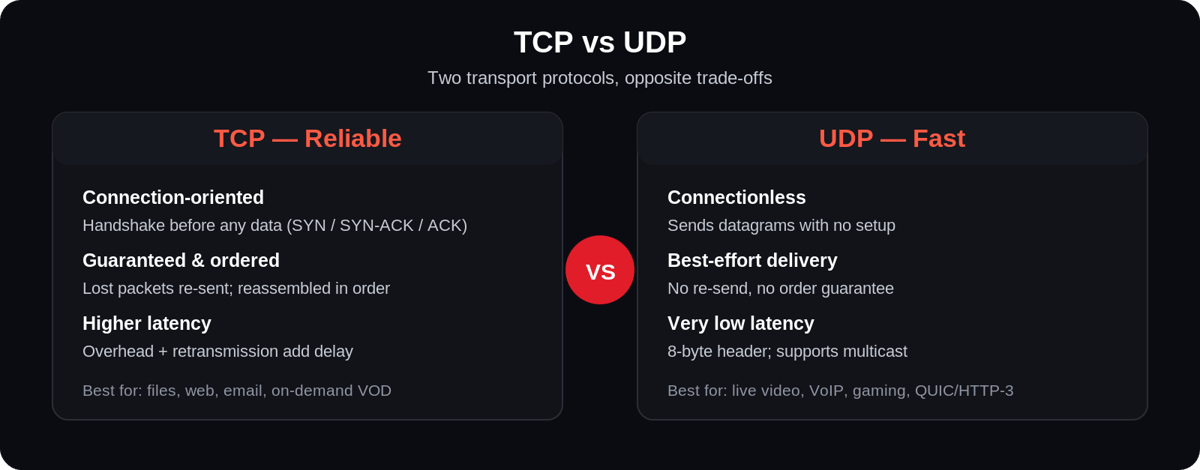
TCP (Transmission Control Protocol) and UDP (User Datagram Protocol) are the two core transport-layer protocols of the internet (IP) suite. TCP is connection-oriented: before sending data it opens a connection with a three-way handshake (SYN → SYN-ACK → ACK), then numbers every packet, waits for acknowledgements, and retransmits anything lost — so data always arrives complete and in order. UDP is connectionless: it fires data off in independent packets called datagrams with no handshake, no acknowledgements and no retransmission. That makes UDP leaner and faster, but it does not guarantee delivery or order.
TCP vs UDP: the key differences
| TCP | UDP | |
|---|---|---|
| Connection | Connection-oriented (handshake first) | Connectionless (no setup) |
| Reliability | Guaranteed delivery + retransmission | Best-effort; packets can be lost |
| Ordering | Packets reassembled in order | No order guarantee |
| Speed / latency | Higher latency (overhead) | Very low latency |
| Error checking | Full: checksums + recovery | Basic checksum only |
| Overhead | Higher (20-byte header, ACKs) | Lower (8-byte header) |
| Best for | Files, web, email, on-demand video | Live video, VoIP, gaming, DNS |
What is an advantage of UDP over TCP?
The headline advantage is lower latency. Because UDP skips the connection handshake and never pauses to acknowledge or re-send lost packets, data reaches the other end with minimal delay. For real-time media that is decisive: a live sports feed or a voice call needs the current moment delivered now — a packet that arrives late is useless, so re-sending it (as TCP would) only makes things worse. UDP's other advantages follow from the same simplicity: less overhead (an 8-byte header versus TCP's 20-byte header plus ACK traffic), support for broadcast and multicast (one stream to many receivers), and lightweight, easy implementation. The trade-off is that reliability and ordering become the application's job, not the protocol's.
Advantages and disadvantages of TCP and UDP
| Protocol | Advantages | Disadvantages |
|---|---|---|
| TCP | Reliable, ordered delivery; built-in error recovery; flow & congestion control | Higher latency; handshake + ACK overhead; unsuited to real-time |
| UDP | Very low latency; minimal overhead; supports multicast/broadcast; simple | No delivery or order guarantee; limited error handling; app must manage loss |
When to use UDP vs TCP
The rule of thumb: choose TCP when every byte must arrive; choose UDP when a late byte is worse than a missing one.
| Use case | Protocol | Why |
|---|---|---|
| File transfer, email, web (HTTP/1-2) | TCP | Completeness and order are essential |
| On-demand / VOD streaming (HLS, DASH) | TCP | Buffered playback tolerates retransmission |
| Live low-latency video, VoIP | UDP | Speed beats perfection; late packets are useless |
| Online gaming | UDP | Real-time state updates need minimal delay |
| DNS lookups | UDP | Tiny, fast, single request/response |
| Modern web (HTTP/3) | UDP (via QUIC) | QUIC adds reliability on top of UDP's speed |
Is UDP faster than TCP?
Yes — in practice UDP is faster for the workloads it suits, because it removes the three things that slow TCP down: the connection handshake, waiting for acknowledgements, and retransmitting lost packets. That said, "faster" means lower latency, not higher raw throughput on every link. For a large file over a clean, high-bandwidth connection, TCP's congestion control can actually deliver excellent throughput. UDP wins when the priority is getting each packet there as soon as possible, and the application can tolerate (or repair) the occasional loss itself.
Why isn't TCP ideal for real-time media?
The single biggest reason is retransmission delay. TCP guarantees delivery by re-sending any lost packet and holding everything behind it until that packet arrives — a behaviour called head-of-line blocking. For a file download that's exactly right. For real-time media (a live match, a video call, pro-audio transport like Dante) it's the wrong trade: by the time TCP re-sends a dropped audio or video packet, the moment it belonged to has already played. The stream would rather skip that packet and stay in sync than freeze waiting for it. TCP's flow and congestion control add further, unpredictable latency. That's why real-time protocols are built on UDP and handle loss their own, lighter way.
How applications add reliability on top of UDP
UDP being "unreliable" doesn't mean real-time streaming is fragile — it means reliability moves up to the application, where it can be tuned. It still carries a basic checksum to detect corruption, and protocols layered on top add just enough recovery: SRT and WebRTC use selective retransmission and forward error correction (FEC) to repair loss without TCP's blocking; QUIC rebuilds ordered, reliable, multiplexed streams over UDP for HTTP/3. The result is the best of both worlds — UDP's low latency with targeted, latency-aware error handling — which is exactly what modern low-latency streaming depends on.
TCP vs UDP for video streaming
This is where the choice gets nuanced. On-demand streaming (Netflix-style VOD) almost always rides on TCP, via HTTP-based adaptive protocols like HLS and DASH: the player buffers a few seconds ahead, so a retransmitted packet arrives in time and the viewer never notices. Data integrity matters more than shaving milliseconds. Live, low-latency streaming leans on UDP-based transport — protocols such as SRT and WebRTC use UDP to keep glass-to-glass delay low, adding their own lightweight loss recovery instead of TCP's heavy retransmission. Contribution feeds often use RTSP/RTP over UDP for the same reason. The modern middle ground is QUIC (the transport behind HTTP/3): it runs over UDP for speed but layers reliability and multiplexing back on top — increasingly used for streaming delivery. So the honest answer to "TCP or UDP for streaming?" is both: TCP for buffered on-demand, UDP for real-time live — and the right bitrate and delivery strategy matters as much as the protocol.
How TCP and UDP affect streaming quality
The protocol shapes the two things viewers feel most: latency and smoothness. Over TCP, a lost packet triggers a retransmit and, on a congested link, head-of-line blocking — playback stays intact but latency climbs, which is why TCP-based live streams can run 10–30 seconds behind real time. Over UDP, there is no waiting: the stream keeps moving, so latency stays low, but a lost packet can show as a brief artifact unless the protocol (SRT, WebRTC) or player conceals it. A robust streaming stack therefore pairs the right transport with adaptive bitrate streaming, which shifts quality up or down to match the viewer's connection — smoothing over the weaknesses of whichever protocol carries the bits.
Deliver live and on-demand at the right latency
Choosing TCP or UDP is a decision your streaming platform should make for you, per stream. Enveu's live streaming platform ingests contribution feeds over RTMP and SRT, transcodes to an adaptive-bitrate ladder, and delivers to viewers via HLS/DASH over a CDN — so live events run at low latency and on-demand plays back smoothly, on web, mobile and TV. It's part of Experience Cloud. For the protocol layer above the transport, see RTMP vs HLS and what RTSP is.