Every time you configure an encoder — whether in OBS for a live stream or in a transcoding pipeline for video-on-demand — you hit one deceptively simple choice: CBR or VBR. Pick wrong and you either waste bandwidth, blow up your file sizes, or hand viewers a buffering, quality-starved stream. Pick right and the same footage looks better, costs less to deliver, and plays smoothly on more devices.
This guide breaks down constant bitrate versus variable bitrate in plain terms: what each one is, how they actually behave, which is better for quality, and exactly when to reach for each — including the settings that matter for YouTube, OBS live streaming, and VOD.
CBR vs VBR in short: Constant bitrate (CBR) holds one fixed bitrate for the whole video, giving predictable, stream-friendly output. Variable bitrate (VBR) raises the bitrate for complex scenes and lowers it for simple ones, giving better quality per megabyte. Use CBR for live streaming; use VBR for on-demand video where quality and file size matter more than a steady data rate.
What is CBR (constant bitrate)?
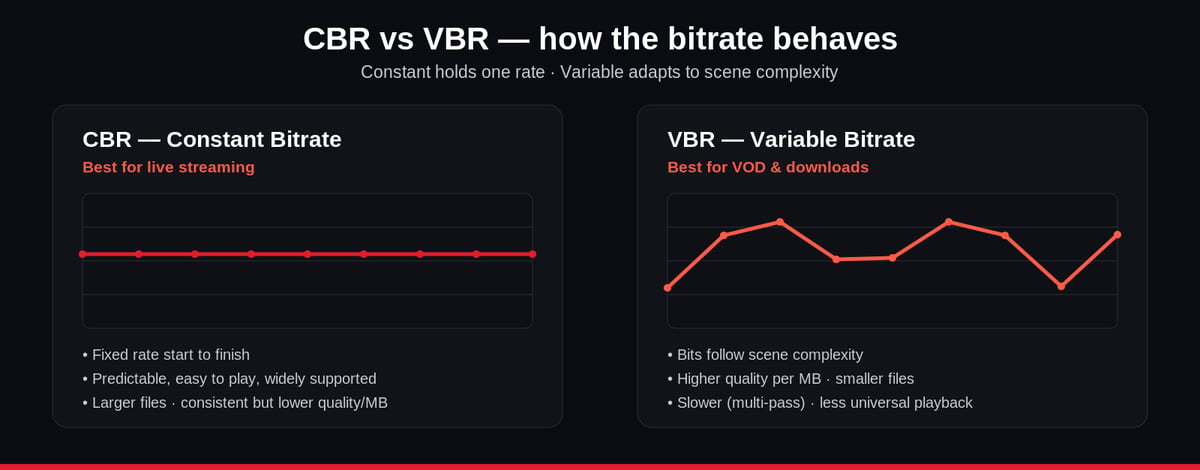
CBR stands for Constant Bitrate. As the name says, a CBR encoder outputs data at one fixed rate from the first frame to the last — set it to 6,000 kbps and it stays at 6,000 kbps whether the scene is a static logo or a fast action sequence. Because the data rate never changes, CBR is completely predictable: it is easy to play back, quick to start, and simple for a network to plan around. That predictability is exactly why CBR is the default for real-time live streaming, where a stable, sustained bitrate keeps the stream in sync with the viewer's connection.
The trade-off is efficiency. CBR spends the same number of bits on a simple scene as on a complex one, so it wastes bandwidth on easy footage and can starve genuinely detailed scenes of the bits they need. Quality is consistent, but rarely the highest possible for a given file size, and CBR is poorly suited to long-term storage.
What is VBR (variable bitrate)?
VBR stands for Variable Bitrate. Instead of a fixed rate, a VBR encoder continuously adjusts the bitrate to match how complex each moment of video is — spending more bits on fast, detailed, high-motion scenes and fewer on slow or static ones. The result is higher visual quality for a given average file size, because bits go where the eye actually needs them.
File size is governed by a simple relationship: file size = bitrate (kbps) × duration, so a higher average bitrate always means a bigger file. VBR keeps that average efficient. The catch is that a constantly changing data rate is harder for some players and networks to handle smoothly, and multi-pass VBR takes longer to encode. That makes VBR ideal for progressive or direct downloads and VOD — think YouTube, Vimeo, or a video library — rather than time-sensitive live broadcasts.
CBR vs VBR: the key differences at a glance
| Factor | CBR (Constant Bitrate) | VBR (Variable Bitrate) |
|---|---|---|
| Bitrate behaviour | Fixed for the whole video | Rises/falls with scene complexity |
| Best for | Live streaming, real-time encoding | VOD, downloads, archiving |
| Quality per MB | Consistent but lower | Higher, better-optimised |
| File size | Larger for the same quality | Smaller for the same quality |
| Encoding speed | Fast (single pass) | Slower (often multi-pass) |
| Playback compatibility | Widely supported, easy to play | Less universal, can be trickier |
| Network predictability | High — easy to plan around | Lower — data rate fluctuates |
CBR vs VBR: which is better quality?
For a given target file size, VBR produces better quality. By reallocating bits from simple scenes to complex ones, VBR removes the visible artefacts — blocking, smearing on motion — that CBR can introduce when a demanding scene runs out of its fixed bit budget. So if pure image quality per megabyte is the goal, VBR wins.
But "better quality" is not the whole story. CBR delivers more reliable, predictable quality in real time, which is often more valuable than a slightly sharper frame. For a live broadcast, a stream that never stalls at a steady 6,000 kbps beats a VBR stream that spikes and risks buffering on a viewer's connection. The honest answer: VBR is better for quality-per-byte on VOD; CBR is better for stability on live.
Should you use CBR or VBR for YouTube?
For uploading finished video to YouTube, VBR is the better choice. YouTube re-encodes everything you upload, so your job is to hand it the highest-quality master at a sensible file size — exactly what VBR (ideally two-pass) delivers. Use CBR for YouTube only when you are live streaming to the platform, where YouTube's ingest expects a stable bitrate. Rule of thumb: VBR for uploads, CBR for going live.
CBR or VBR in OBS for live streaming?
In OBS and similar live encoders, CBR is the recommended and most common setting. Streaming platforms — YouTube Live, Twitch, Facebook Live — are tuned for a constant ingest bitrate, and CBR keeps your stream stable and in spec. VBR in a live context can cause bitrate spikes that overwhelm a viewer's connection and trigger buffering. Reserve VBR (and multi-pass encoding) for recording or for VOD files you will upload later, not for the live push itself.
The three types of VBR (and 1-pass vs 2-pass)
VBR isn't one setting — encoders typically expose three modes, which is where single-pass and multi-pass (two-pass) encoding come in:
- Quality VBR — single-pass encoding guided by a target quality level. The encoder spends whatever bitrate is needed to hit that quality, so the final file size is unpredictable. Good for maximising quality when size isn't a hard constraint.
- Unconstrained VBR — multi-pass encoding guided by a target average bitrate. The first pass analyses the video; later passes distribute bits to hit that average while chasing the best possible quality across segments. Great quality-to-size balance for VOD.
- Constrained VBR — multi-pass encoding with a set maximum bitrate and buffer window as well as an average. The cap keeps peaks from exceeding what a network or player can handle, making it the safest VBR mode for adaptive delivery.
The pattern is simple: single-pass is faster; two-pass is slower but smarter, because the encoder "reads" the whole video before deciding where to spend bits. For quality-critical VOD, two-pass constrained VBR is usually the sweet spot.
How to choose: CBR or VBR for your use case
| Your scenario | Best choice | Why |
|---|---|---|
| Live streaming to Twitch / YouTube Live | CBR | Stable ingest, no buffering, platform-compliant |
| Uploading finished video to YouTube/Vimeo | VBR (2-pass) | Best quality at an efficient file size |
| Building a VOD / streaming library | Constrained VBR | High quality with a safe bitrate ceiling |
| Bandwidth- or storage-constrained delivery | VBR | Smaller files for the same quality |
| Time-sensitive, real-time encoding | CBR | Predictable, fast, single-pass |
A common mistake is treating this as a permanent, all-or-nothing decision. In practice, professional streaming operations use both: CBR at the live ingest point for stability, then VBR when the recording is transcoded into an optimised set of bitrate renditions for on-demand playback. The right answer depends on where in the pipeline you are.
Where CBR and VBR fit in a real streaming pipeline
On a modern OTT platform, you rarely pick a single bitrate at all — you deliver an adaptive bitrate ladder so each viewer gets the best quality their connection can sustain. That means the same source is encoded at several bitrates, using CBR or constrained VBR per rendition depending on whether it feeds live or on-demand playback. Getting that ladder right is the difference between a stream that buffers and one that doesn't.
Enveu's live streaming platform and Content Manager handle this automatically: they ingest your live feed (RTMP/SRT) and run adaptive-bitrate transcoding up to 4K, generating the right rendition set for both live and VOD without you hand-tuning every encoder. If you're weighing encoder choices more broadly, our guides on hardware encoders and RTMP vs HLS cover the surrounding decisions. The takeaway on CBR vs VBR itself stays simple: CBR for stable live delivery, VBR for efficient, high-quality on-demand.
Written by Chandan Luthra, Enveu — helping broadcasters ship better-looking streams at lower delivery cost.