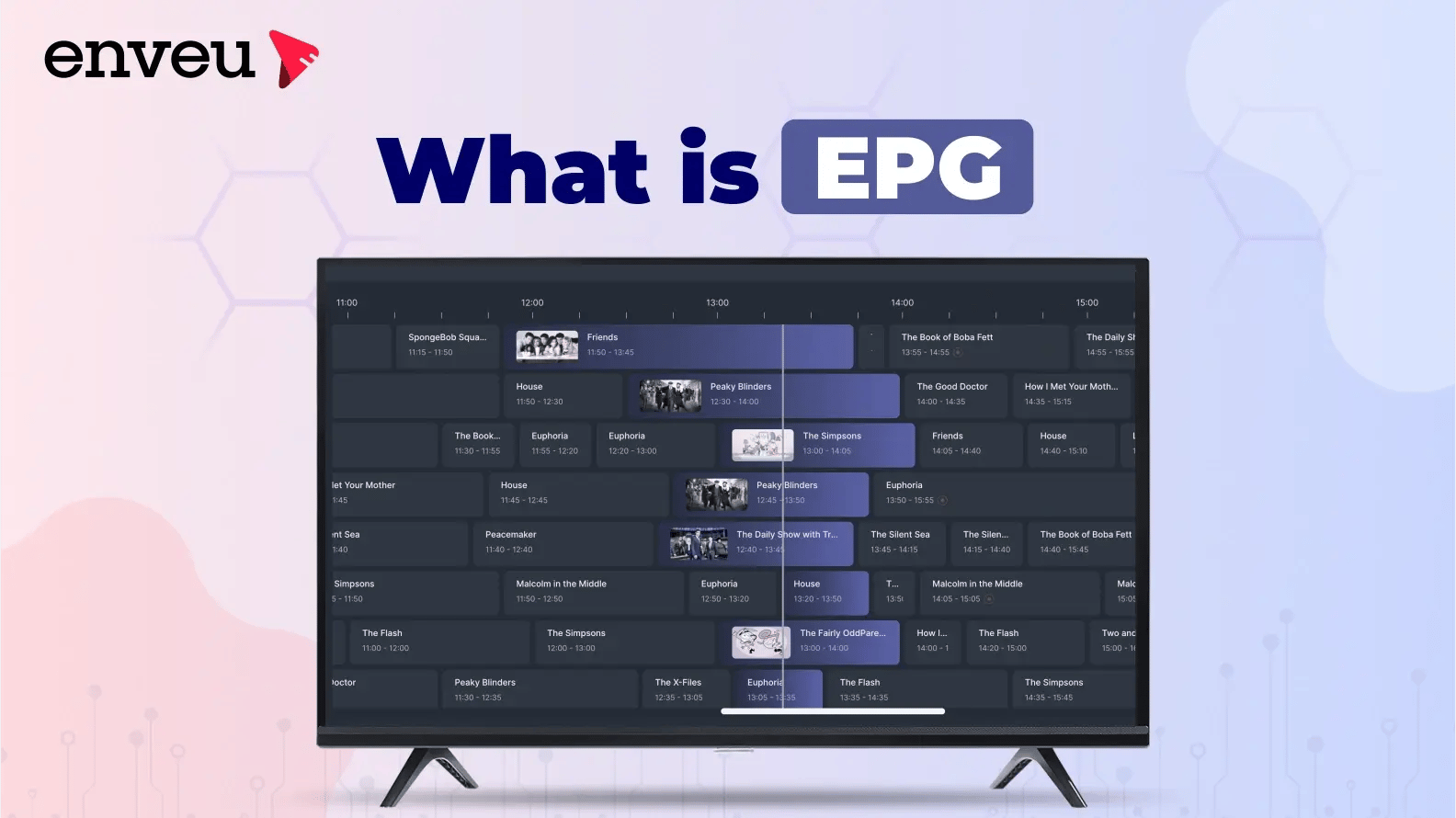
An EPG (Electronic Program Guide) is the on-screen menu that shows what’s playing now, what’s on next, and what’s scheduled — across live TV, FAST, and IPTV/OTT channels. "EPG" stands for Electronic Program Guide (its full form). Viewers open it with the Guide button to browse listings, read show info, and set reminders or recordings. Broadcasters feed it a schedule that the headend or OTT platform turns into that grid.
What does EPG mean, stand for, and its full form
EPG stands for Electronic Program Guide (also spelled "Electronic Programme Guide") — that’s its full form. In plain terms, the EPG is the interactive TV schedule: the on-screen guide that lists what’s on across all your channels, now and in the days ahead. When someone asks "what does EPG mean on a TV," this is the answer — it’s the built-in program guide you open to see the line-up, not a separate app or subscription.
You may also see the term IPG (Interactive Program Guide) used for EPGs that add search, filtering and one-tap tune-in. And in a few non-TV contexts "EPG" means something else entirely (for example, a payment-gateway abbreviation) — but on any television, set-top box, or streaming app, EPG means the Electronic Program Guide.
What is an EPG?
An EPG is the layer that turns a raw list of programmes into something a viewer can browse. For the viewer it answers three questions at a glance: what aired before, what’s on now, and what’s coming up. For the broadcaster or streaming operator, it’s a scheduling and promotion tool — a calendar that can run a day, a week, or a month ahead, and the single most important way viewers discover live and linear TV content. Modern EPG operations lean on broadcast workflow automation to keep listings, recordings and VOD in sync automatically.
Behind the scenes it’s data, not magic: the operator supplies a structured content list (title, start time, duration, description, rating, genre, artwork) and the playout system or OTT platform renders it as the on-screen guide, updated in real time. It’s the backbone of FAST channels, cable, IPTV and live OTT alike.
What does EPG mean on a TV?
On a television, the EPG is the guide screen that overlays or replaces live video to show the schedule. Open it and you get a grid of channels down one side and time across the top, so you can see every channel’s current and upcoming programmes at once. Selecting a show reveals its synopsis, cast, rating and running time, and lets you tune in, set a reminder, or record it. It’s the difference between flicking blindly through channels and actually seeing what’s on before you commit.
The EPG button on your remote
Most TV and set-top-box remotes have a dedicated way to open the guide. It’s usually a button labelled "Guide," "EPG," or "TV Guide," sometimes shown as a grid icon. Pressing it opens the Electronic Program Guide; pressing it again (or hitting Back/Exit) closes it and returns you to live TV. On remotes without a labelled Guide button, the EPG is typically reachable from the Home or Menu button, or by pressing the up/down arrow while watching a live channel. On streaming remotes (Fire TV, Android TV, Apple TV), the "guide" lives inside the live-TV or channels app rather than on a physical button — more on that below.
EPG vs channel grid vs mini-guide
| What it is | Where you see it | Interactivity | |
|---|---|---|---|
| EPG (full guide) | Full schedule across all channels, days ahead | Guide button on TV / OTT app | Browse, search, remind, record |
| Now & Next (mini-guide) | Just the current + next programme on one channel | Banner while watching | Minimal — quick peek |
| Channel grid | Time × channel matrix view of the EPG | Inside the guide | Scroll by time and channel |
How an EPG works
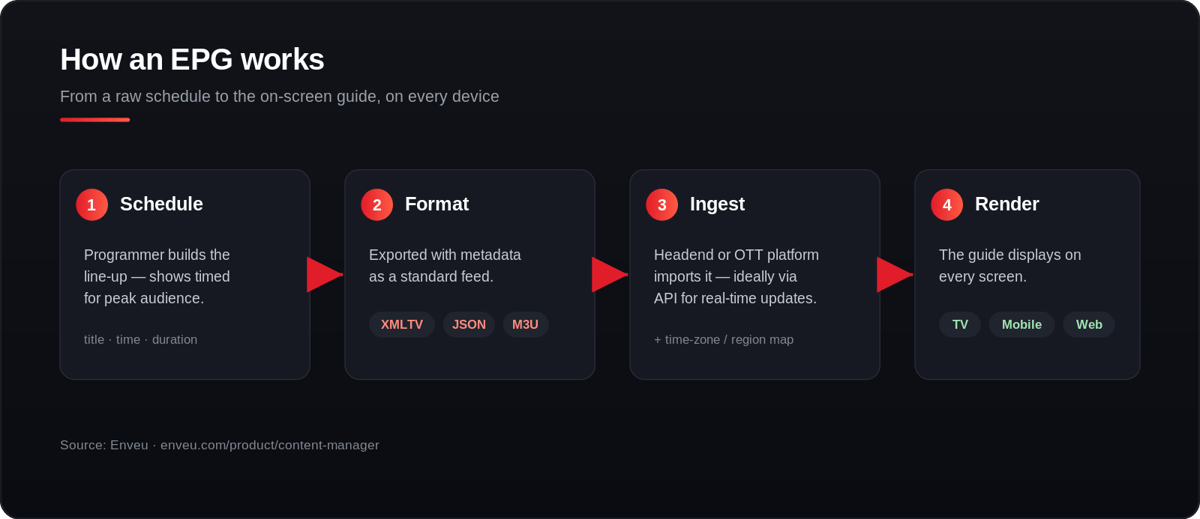
- Schedule created — the programmer builds the line-up, timing shows for peak audience.
- Data formatted — the schedule is exported with metadata (synopsis, cast, rating, genre, images) in a standard feed such as XMLTV, JSON or M3U.
- Ingested — a traditional headend or a modern OTT platform imports it, ideally via API/automation so updates are real-time.
- Rendered — the platform maps it to time zones and regions and displays the guide on every screen (TV, mobile, web).
The quality of an EPG lives or dies on that metadata: accurate times, rich descriptions and artwork are what make a guide feel premium instead of a bare list of titles.
What is EPG time-shift (timeshift)?
EPG time-shift means using the guide to watch programmes outside their original broadcast time — pausing, rewinding, or jumping back to something that already aired. A time-shift-enabled EPG doesn’t just show the future schedule; it also lets you scroll backwards along the timeline to a show that’s already finished and play it from catch-up. That’s the core of time-shifted TV: the live schedule becomes a window you can move through in both directions.
In practice, EPG timeshift powers features like start-over (restart a show already in progress), pause live TV, rewind, and catch-up TV (watch anything from the last few days). It’s what makes a modern guide feel less like a printed listing and more like an on-demand library layered on top of live channels — and it’s one of the most-requested features for IPTV and OTT services, because it frees viewers from the broadcast clock.
The EPG timeline
The EPG timeline is the horizontal time axis running across the top of the guide. Each channel’s programmes sit as blocks along it, sized by duration, so a two-hour film is twice as wide as a one-hour show. Scrolling right moves you further into the future schedule; on a timeshift-enabled service, scrolling left moves you back through programmes that have already aired. The "now" marker — usually a vertical line — shows the current moment, making it instant to see how far into a live programme you are and what’s coming next. A clear, fast timeline is what separates a pleasant guide from a frustrating one.
EPG on TV vs EPG in IPTV/OTT
On a TV or set-top box, the EPG is opened with the Guide button and reflects the broadcaster’s linear schedule — scan channels, see show info and duration, set reminders or recordings, and jump to catch-up where available. It’s essential for linear and FAST channels, which live or die by scheduling.
In IPTV/OTT, the same idea is delivered over the internet: the operator defines the schedule for each streamed channel, and viewers browse upcoming programmes across all channels in-app. Because it’s software, OTT EPGs can add personalization, cross-device sync and one-tap tune-in that classic broadcast guides can’t. If you’re weighing the two delivery models, see IPTV vs OTT and our guide to how IPTV works.
What does EPG mean on Firestick and streaming devices?
On streaming devices like Amazon Fire TV / Firestick, Android TV and Apple TV, there usually isn’t a physical "Guide" button — instead the EPG lives inside a live-TV or channels app. On Firestick, for example, the live guide appears in apps that offer live channels (and in Fire TV’s own live tab), showing the same now/next grid you’d get on a cable box. So "what does EPG mean on Firestick" comes down to this: it’s the in-app channel guide for the live and FAST content that app carries, not a system-wide TV guide. The concept is identical to broadcast; only the way you open it differs. The same is true across OTT TV boxes and smart TVs.
Key EPG features
- Now/next + multi-day listings (typically up to a week or two ahead)
- Programme metadata — synopsis, cast, rating, genre, artwork
- Reminders & recordings (and, on OTT, watchlists)
- Time-shift — pause, rewind, start-over, and catch-up on missed shows
- Search & filter by genre, channel, or keyword
- Personalization — recommendations and, increasingly, voice/assistant control
What format is EPG data in?
EPG schedules are exchanged in a handful of standard formats. XMLTV is the most common — an XML schema listing channels and programmes with times and metadata. Many IPTV setups pair an M3U playlist (the channel list) with an XMLTV EPG source (the schedule). Modern OTT platforms increasingly ingest schedules via JSON APIs, which makes real-time updates and automation easier than static files. Whatever the format, the job is the same: deliver accurate titles, times, descriptions and images that the platform maps to time zones and renders as the guide.
A brief history of the EPG
The first EPG launched in North America in 1981 (United Video Satellite Group’s "Electronic Program Guide" cable channel). The ’90s "Super Guide" added two-week listings; the 2000s brought interactive digital EPGs; the 2010s moved the guide onto smart TVs and mobile apps; today EPGs add AI recommendations, cross-device sync and deep time-shift. The through-line across four decades is the same: help viewers find something to watch, fast.
How to add an EPG to your OTT platform
If you run a linear, FAST, or hybrid streaming service, the EPG isn’t a nice-to-have — it’s how viewers find your live content. Building one means ingesting schedule data, enriching it with metadata and images, mapping it to regions and time zones, adding time-shift and catch-up, and rendering a responsive guide across TV, mobile and web.
On Enveu’s Content Manager, EPG ingestion and playout are built in — you bring your schedule and the guide renders natively across every screen, so you’re not stitching this together per platform. We’ve deployed EPG-driven experiences for sports organisations and broadcasters across the globe, live on TV, mobile and web. For live channels specifically, see the live streaming platform; for the wider content workflow, see video CMS; and for how OTT delivery differs from traditional broadcast, see what OTT in broadcasting means.