Offline viewing is the ability to download a video to your device and watch it later without an internet connection. The downloaded file is encrypted and DRM-protected, tied to your account, and usually expires after a set period or once you've finished watching — so it isn't a permanent copy you can share. It lets people keep watching on planes, commutes and in low-connectivity areas, which is why most major streaming apps offer it.
What is offline viewing?
Offline viewing (or "downloading to watch offline") means saving a movie, episode or series to a phone, tablet or app so it plays without a live internet connection. It's different from a normal file download: the video stays inside the app, is encrypted, and follows the service's licensing rules. In short — watch now, download for later, no signal required.
What does offline viewing mean?
"Offline viewing," "watch offline," "offline download" and "download to watch later" all describe the same thing: content saved in the app for playback without internet. The key nuance is that it's not the same as owning the file. A downloaded title is a temporary, licensed copy — encrypted, locked to your account, and governed by an expiry window. You're not buying the file; you're borrowing an offline copy for as long as your subscription and the title's licence allow. That protection relies on encryption; for the streaming-layer equivalent, see HLSe (HLS encryption).
How does watching offline work?
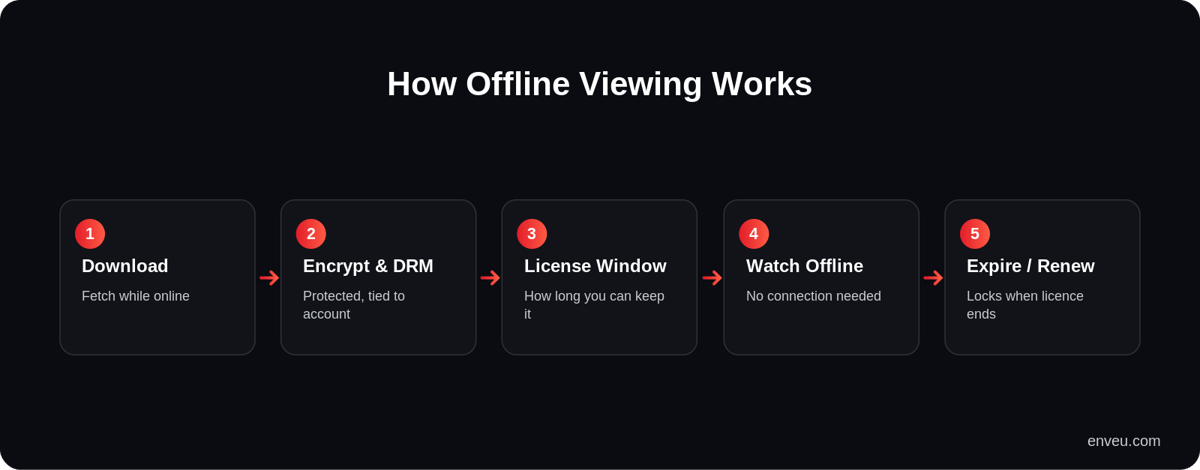
- Download — you tap download while online; the app fetches the video (often at a quality you choose).
- Encrypt & protect — the file is stored encrypted with DRM, tied to your account and device, so it can't be copied out or shared.
- License window — a licence sets how long you can keep it and how long after starting you must finish (expiry rules).
- Watch offline — the app plays the protected file with no connection needed.
- Expire / renew — when the licence lapses, the download locks; reconnecting can renew it.
How to watch a video offline
From a viewer's side it's simple: open the title in the app, look for the download icon (a downward arrow), pick a quality if offered, and wait for it to save over Wi-Fi. The title then appears in a "Downloads" section you can open with no connection. To free up space, delete downloads when you're done — and remember they may expire on their own after a set period. Downloading over Wi-Fi (not mobile data) is the usual advice, since video files are large.
Streaming vs offline viewing
| Streaming | Offline viewing | |
|---|---|---|
| Internet needed | Yes, while watching | Only to download; play offline after |
| Stored on device | No (buffered temporarily) | Yes, as an encrypted file |
| Protection | DRM in transit | DRM at rest, tied to your account |
| Expiry | N/A | Licence window; download locks when it lapses |
| Best for | Home / good connectivity | Travel, commutes, low-data areas |
Does offline viewing use data (and is it free)?
Downloading a title uses data once — when you save it — after which playback uses no data at all. That's the whole appeal: download on Wi-Fi, watch on a flight or commute without touching your mobile allowance. Offline viewing itself is normally a free feature of a paid subscription rather than an extra charge — if you subscribe, downloads are usually included. It also saves data overall for anyone who rewatches, since a downloaded episode plays as many times as you like without re-streaming.
Offline viewing vs offline download vs "save"
People use these terms loosely, so it helps to separate them. Offline viewing / offline download in a streaming app means a licensed, encrypted copy you can only play inside that app, with expiry rules — you don't get the raw file. A plain file download (say, an MP4 you save from the web) is an unmanaged file you own outright and can move around — which is exactly why licensed content isn't offered that way. "Save for later" on some services just bookmarks a title to a list; it doesn't download anything. When a streaming service says "download," it almost always means the protected, in-app offline-viewing kind.
What content supports offline viewing?
| Content type | Offline support |
|---|---|
| On-demand movies & series (SVOD) | Common — most subscription apps allow downloads |
| Ad-supported (AVOD/FAST) | Rare — the ad model doesn't fit offline as neatly |
| Live & sports | Usually not — live content is streamed in real time |
| Rented / purchased (TVOD) | Often, within the rental/ownership window |
| Licensed third-party titles | Depends — some rights-holders disallow downloads |
Which platforms offer offline viewing?
Most major streaming services support downloads for offline viewing on their mobile apps, subject to licensing — some titles can't be downloaded because rights-holders don't allow it. Availability, download limits (how many titles or devices) and expiry windows vary by service and even by title, so the same app may let you download one show but not another. It's most common on subscription video apps and less common on free ad-supported or live services, where the rights and business model don't fit downloads as neatly.
Limits and things to know
- Expiry — downloads can expire after a set time, or a shorter window once you press play.
- Device/title caps — services often limit how many titles or devices can hold downloads at once.
- Not shareable — the file is encrypted and account-locked; you can't send it to someone.
- Storage — video is large, so downloads eat device space; lower quality saves room.
- Licensing gaps — some content simply isn't downloadable where rights don't permit it.
Why offer offline viewing?
For a streaming operator, offline viewing is a retention and reach feature. It keeps viewers engaged during flights and commutes, and it's essential in markets with expensive data or patchy connectivity, where users download on Wi-Fi and watch later. Done well, it increases watch time without increasing bandwidth cost at play-time — you pay to deliver the download once, then it plays for free.
There's a competitive angle too. In many fast-growing streaming markets, users are mobile-first and data-conscious, and "does it have downloads?" is a real deciding factor between services. Offering reliable, DRM-protected offline viewing signals a premium, polished app — and it deepens engagement, because a viewer who has downloaded three episodes for a flight is far more likely to keep the subscription than one who hasn't. The flip side is that it must be done securely: downloads are exactly the moment content leaves your servers, so encryption, licensing and expiry have to be watertight, or you're handing out copyable files.
How long can you keep offline downloads?
It depends on the service and the title's licence, not on you. Typically a download stays valid for a number of days after you save it, with a shorter clock (often 48 hours) that starts once you press play — after which it needs an internet check-in to renew, or it locks. Some titles allow only a limited number of downloads per licence period. None of this is arbitrary: the windows come from the content-licensing agreements, which is why the same app can give one show a generous window and another a tight one.
Add offline viewing to your app
Offering downloads means combining video packaging, DRM licensing and expiry logic across devices — non-trivial to build safely. Enveu's apps support offline/downloaded viewing for videos and series, with DRM-protected downloads, so your audience can watch on the go while your content stays protected. Content is managed and packaged in the Content Manager and monetized with SVOD/AVOD/TVOD/hybrid — all part of Experience Cloud.