A hardware encoder is a dedicated device that compresses a camera or HDMI/SDI signal into a streamable format (H.264/HEVC) in real time — more reliable and lower-latency than software for professional live streaming. The best hardware encoders for live streaming include LiveU Solo, Teradek Vidiu, Epiphan Pearl, AJA HELO, Blackmagic ATEM Mini Pro and Haivision Makito — the right one depends on your resolution (up to 4K), input (HDMI/SDI/NDI), protocol (RTMP/SRT) and network. All of them feed a streaming platform that does the transcoding and delivery.
What is a hardware encoder, and why does it matter?
A hardware encoder is a purpose-built appliance that takes a video signal (from a camera, switcher or capture source) and compresses it with a codec like H.264 or the more efficient HEVC/H.265, then sends it out over RTMP or SRT. Because encoding is its only job, a hardware encoder runs cooler, more reliably and at lower latency than encoding on a shared computer — which is why it's the professional choice for live broadcasts, 24/7 channels and any stream you can't afford to drop.
Hardware encoder vs software encoder
A software encoder (OBS, vMix, Wirecast on a PC) is cheap and flexible and great for getting started. A hardware encoder is a dedicated box built for reliability and low latency — the right call for professional, mission-critical or always-on streams. Many productions use both: software for the studio switch, hardware for the field feed. For the full picture, see hardware vs software vs cloud encoders.
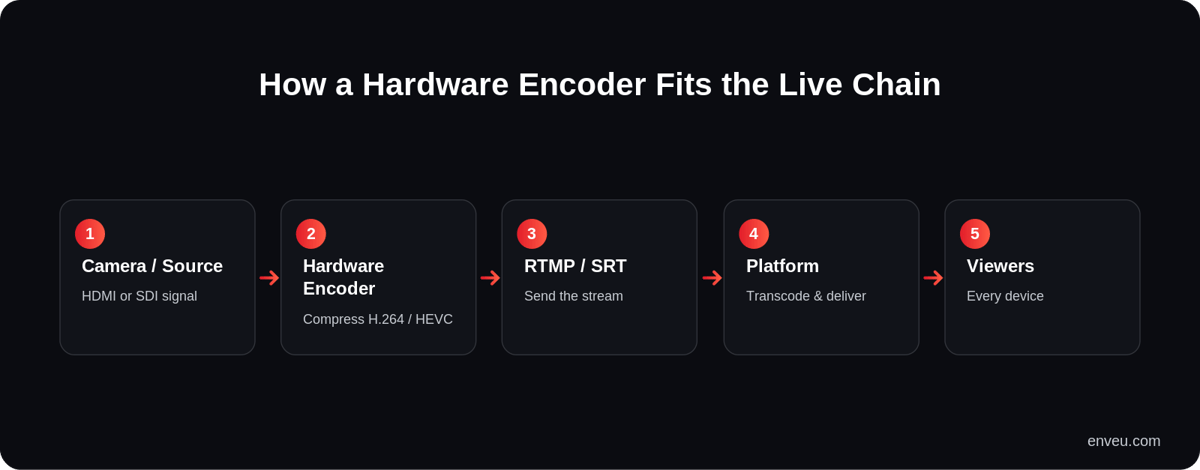
How a hardware encoder fits in the live chain
Best hardware encoders for live streaming
| Encoder | Known for |
|---|---|
| LiveU Solo | Simple, portable bonded-cellular encoding for reliable field/IRL streaming. |
| Teradek Vidiu / Prism | Broadcast-grade portable encoders; bonded cellular and HEVC/4K on higher models. |
| Epiphan Pearl (Nano / 2) | All-in-one encode + switch + record; a workhorse for events and lecture capture. |
| AJA HELO | Reliable standalone H.264 stream-and-record; simple to deploy and leave running. |
| Blackmagic ATEM Mini Pro | Cost-effective switcher + streaming from the popular Blackmagic ecosystem. |
| Datavideo NVS-series | Straightforward SDI/HDMI stream-and-record units for fixed installs. |
| Haivision Makito | Broadcast-grade, ultra-low-latency SRT for critical/pro contribution. |
Best hardware encoder, by use case
- Best for mobile / outdoor / IRL — a portable, bonded-cellular encoder (LiveU Solo, Teradek).
- Best for events / all-in-one production — Epiphan Pearl or Blackmagic ATEM Mini Pro (encode, switch, record in one box).
- Best for broadcast / low-latency contribution — Haivision Makito with SRT.
- Best for schools, worship, fitness, 24/7 channels — a set-and-forget standalone unit (AJA HELO, Datavideo).
- Best for 4K — a device with HEVC and 4K in/out (Teradek Prism, higher-end Haivision).
How to choose the best hardware encoder (5 steps)
- Define your output resolution. Do you need 4K, or is 1080p enough? 1080p60 is still the most-consumed resolution for live sports and events; only go 4K if your cameras and delivery support it.
- Identify your input source. HDMI from a camera/laptop, SDI from a broadcast camera, or NDI from a software production? Match the encoder's inputs to your source.
- Choose your streaming protocol. SRT is the standard for reliable internet transmission; RTMP is still used for platform ingests. Confirm what your destination platform/CDN accepts before buying.
- Consider your network. Fixed fibre facility, or an unpredictable stadium Wi-Fi? For remote events, look for bonded cellular or dual-network failover.
- Match it to your platform. An encoder is only as good as what receives the stream — you need a platform that handles ingest, adaptive-bitrate transcoding, delivery and analytics, not just a stream destination.
What to look for in a hardware encoder
- Codecs — H.264 for compatibility, HEVC for 4K at lower bitrate.
- Protocols — RTMP is universal; SRT is better on unreliable networks.
- Resolution & frame rate — match your source (1080p60, 4K).
- Latency & reliability — critical for interactive, broadcast and 24/7 use.
- Bitrate control — see our bitrate guide.
Common mistakes when buying a hardware encoder
- Buying for specs, not workflow — a 4K encoder is wasted if your cameras output 1080p and your delivery doesn't do 4K adaptive bitrate. Buy for your real workflow.
- Ignoring the network — the best encoder still fails on a weak, un-bonded connection. Match the encoder to where you'll actually stream from.
- Forgetting the destination — check your platform's supported protocols and ingest before you buy, or you'll be stuck transcoding around it.
Do you still need a hardware encoder?
Not always. If your streaming platform ingests a standard RTMP/SRT feed and does the heavy transcoding in the cloud, a simple software encoder — or even a phone app — is enough to send the stream, and the platform handles the rest. Hardware still wins where reliability is non-negotiable: broadcast, 24/7 channels, big live events, and field production over cellular. For a studio getting started, software plus a cloud platform is often the smarter first step; add hardware when the stakes rise.
Hardware encoder specs to compare
When you shortlist encoders, line them up on the specs that decide real-world performance:
| Spec | What to check | Why it matters |
|---|---|---|
| Max resolution / fps | 1080p60, 4K30/60 | Must match your camera and audience screens |
| Codecs | H.264, HEVC/H.265 | HEVC halves bitrate for the same quality — key for 4K |
| Inputs | HDMI, SDI, NDI, USB | Has to fit your camera/switcher outputs |
| Protocols | RTMP, RTMPS, SRT | SRT for unstable networks; RTMP for platform ingest |
| Connectivity | Ethernet, Wi-Fi, bonded cellular | Bonded cellular keeps field streams alive |
| Extras | Record-to-SD, multi-destination, battery | Backup recording and simultaneous outputs |
How to set up a hardware encoder
- Connect your source — camera or switcher into the encoder via HDMI/SDI.
- Set resolution, frame rate and codec — e.g. 1080p60, H.264 (or HEVC for 4K).
- Choose bitrate and CBR — pick a bitrate your upload can sustain; use constant bitrate for live. See CBR vs VBR and our bitrate guide.
- Enter your destination — the RTMP/SRT ingest URL and stream key from your platform.
- Test before you go live — run a short stream and confirm zero dropped frames.
Where your encoder sends the stream
A hardware encoder handles compression, but it still needs a platform to ingest, transcode and deliver the stream to viewers at scale. Enveu's live streaming platform ingests RTMP and SRT from any hardware encoder, transcodes to adaptive bitrate up to 4K, delivers via integrated CDN across web, mobile and TV, and reports viewer analytics — with monetization built in. So you pair the encoder that fits your shoot with a platform that does everything after it. It's part of Experience Cloud.