Digital Media has become an indivisible part of our lives. Digital media includes audio, video and clips. So, what goes beyond the smooth playback and crispy videos that make our lives better?
However complex the process may be, this blog will help you understand it. Digital media include audio, video, and various image types such as MP4, MOV, MKV, and MP3. The objective of this process is to store and deliver data efficiently.
The crux of the matter is how a video looks great on various devices, such as a TV, laptop, or mobile phone, without compromising quality. Encoding and Transcoding are the two processes that make it happen.
This blog helps you understand the difference between transcoding vs encoding. It explains where each process fits in digital media workflows. Content creators, developers, and media distributors' objective is to deliver a quality viewing experience to their audience. Therefore, they need to understand this difference.
What is Encoding?
Raw files are large and consume a significant amount of data. Hence, they cannot be easily distributed or shared, nor can they be streamed. That’s where encoding comes into play, compressing these heavy files to make them lighter. These light-weight files can be streamed easily and shared across devices.
Converting raw format into a usable format is encoding.
Why You Need Encoding?
- Compression: To reduce file size without losing quality. Encoding makes it easy to store and transmit digital media.
- Standardisation: Encoding makes digital media compatible on multiple devices
Common Use Cases
- Convert raw camera footage into MP4 (H.264) format, enabling smooth playback of the media.
- Save audio file in MP3 format, making it easy to share online.
What is Transcoding?
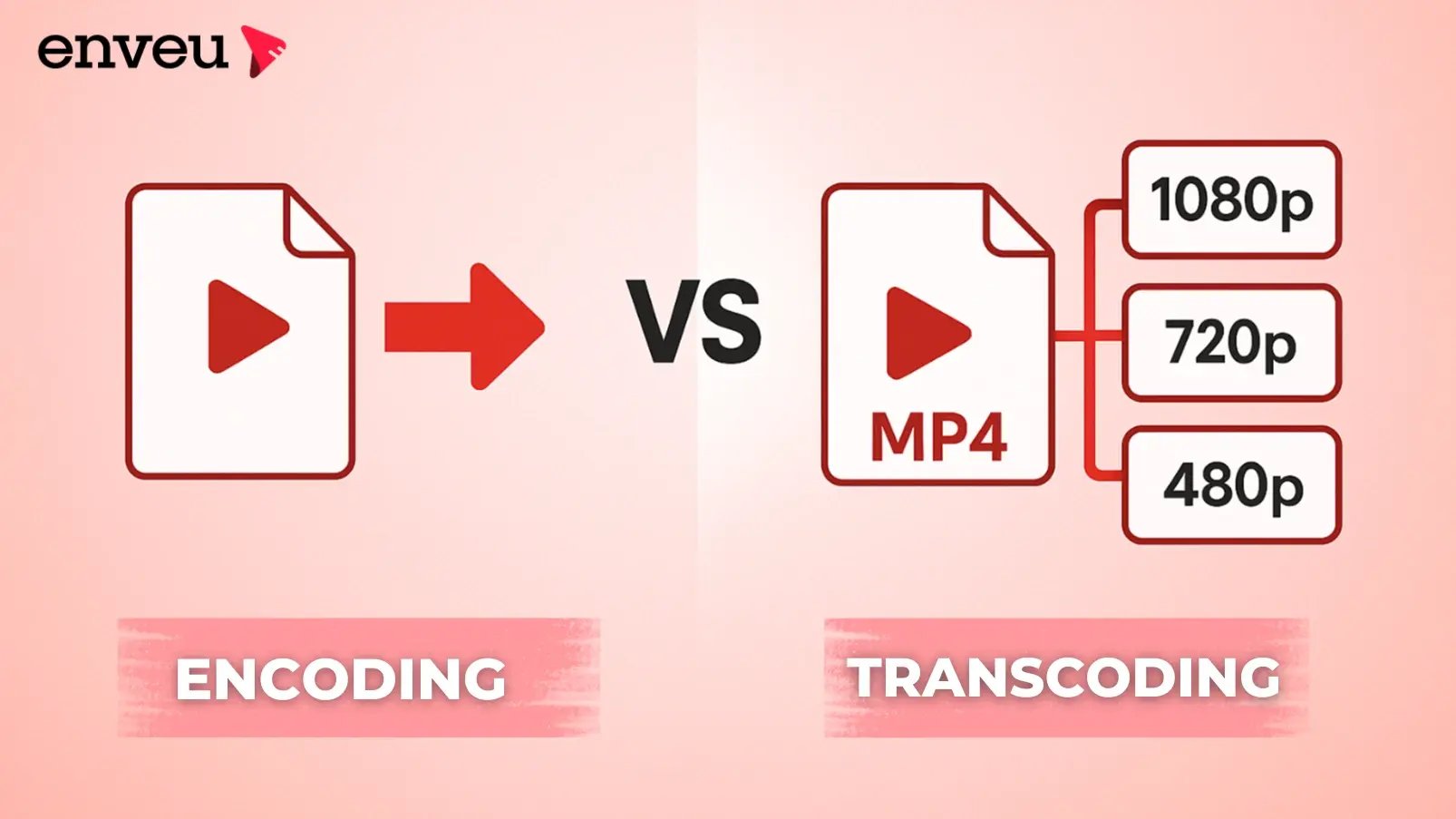
If encoding is the first step, the next is transcoding. It further converts one encoded format into another. It means that transcoding re-encodes an already encoded file.
Why is transcoding necessary? Different platforms, devices and networks require different formats and resolutions. This cannot be done through encoding alone. Hence, transcoding is required.
What does transcoding achieve?
- Compatibility: Converts media from one format to an adaptable as per the device or platform (e.g., MOV to WebM).
- Optimisation: It adjusts the resolution or bitrate of a media, which reduces its file size.
- Adaptability: Transcoding creates different versions of the same video, allowing them to adapt to various resolutions, whether for HD or Wi-Fi users or mobile data users.
Common Use Cases
- Creating mobile-friendly versions of HD videos.
- Each stream platform has unique format requirements. Transcoding generates content to fulfil this requirement.
Key differences: Transcoding vs Encoding
|
Aspect |
Encoding |
Transcoding |
|
Source |
Raw, uncompressed media |
Already encoded media |
|
Goal |
Create a playable digital format |
Modify an existing format for compatibility or optimisation |
|
Process Type |
Initial compression and formatting |
Re-encoding or converting existing compressed files |
|
Common Use |
When creating new digital files |
When preparing content for streaming or platform-specific needs |
|
Example |
RAW video → MP4 (H.264) |
MP4 (H.264) → WebM (VP9) |
|
Analogy |
Packing raw items into labelled boxes |
Repacking boxes to fit new destinations |
Choosing the Right Process
It’s crucial to understand your media’s stage and purpose to choose the right encoding or transcoding method.
When to use Encoding?
- If you want to convert a raw input from a camera, microphone, or screen recording.
- You want to create digital files for storage, editing, or distribution.
- When you want to ensure consistent playback across devices.
When to use Transcoding?
- You’re creating adaptive bitrate streaming (ABR) files for YouTube, Netflix, or Twitch.
- You want to reduce file size, enabling them to stream on slower networks.
- You want to reduce file size for better performance on slower networks.
Pro Tip: Use transcoding only when necessary. Each time a file is transcoded, some quality is lost. This issue is known as generational loss. Always use the highest-quality source possible before starting the process.
Impact and Considerations
Encoding and transcoding has a crucial role in how media's creation, storage and delivery. However, each has its unique impact and technical considerations.
File Quality
- Media quality greatly depends on encoding. If the encoding is poor, the the video or audio will never perform well, regardless of how much you edit it later.
- Transcoding reduces the quality of the file every time due to recompression. However, using high-quality codecs can avoid repeated conversions.
File Size
- Both encoding and transcoding impact file compression and resolution.
- Encoding reduces the size of the raw file substantially. Transcoding fine-tunes it for specific needs, such as streaming over mobile data or optimising for the web.
Processing Needs
- Both encoding and transcoding require CPU/GPU resources. However, transcoding consumes more power as it has to decode and re-encode an already compressed file.
- Developers utilise hardware acceleration or cloud transcoding services to expedite these processes.
Strategic Choice
- Quality, size and performance depend on the proper format and codec.
- For example:
- H.264 is commonly used to deliver general video.
- H.265 (HEVC) offers better compression with high quality.
- VP9 or AV1 are modern codecs preferred by streaming platforms.
Transcoding vs Encoding in Everyday Life
Knowingly or unknowingly, you use these processes daily. Here are the instances.
- What happens when you upload a video to YouTube? The codec converts it to 144p, 360p, 720p, and 1080p or higher. It thus allows users to select the most suitable option based on their internet speed.
- Encoding ensures the film is in a digital format. With transcoding, you confirm that it is compatible with various devices. For example, when a movie studio prepares content for Netflix, Prime Video or a similar OTT platform.
- When social media apps compress your video before posting, that’s encoding. When they optimise it for faster playback, that’s transcoding.
What are the best practices for Encoding and Transcoding?
Always encode the file from the source. Do not encode or transcode a previously compressed file.
Select the Right Codec
- General playback: H.264
- Web Streaming: VP9
- UHD Content: H.265
Monitor Bitrate and Resolution
A higher bitrate equals better quality. However, it results in a larger file size. An option is required that balances the audience’s devices and network speeds.
Test On All Platforms
Ensure your encoded or transcoded media plays smoothly and without issues on desktops, mobile devices, and smart TVs.
Leverage Cloud Processing
Cloud-based encoding and transcoding tools like AWS Elemental or FFmpeg automation can save time and reduce hardware dependency.
Conclusion: Mastering Media Efficiency
Encoding and transcoding are those silent engines that power today’s digital media. Encoding helps you convert raw data into digital formats. However, they may not be compatible with every device or platform. That’s where transcoding comes into play, which ensures the compatibility of digital media.
It’s vital for you to understand transcoding vs encoding. It helps you choose the appropriate process, which ultimately saves time and reduces file size while retaining quality.
For content creators and developers, both processes ensure that their digital media will display in high quality with smooth playback. For distributors, it guarantees smooth delivery worldwide.
Encoding and transcoding are here to reshape the creation, delivery, and user experience of digital media. Understanding the difference between transcoding vs encoding isn’t just limited to technical knowledge. It’s one of the key elements to delivering a flawless digital experience.