Virtual fitness has gone from pandemic stopgap to a permanent revenue stream — the global virtual-fitness market is on track to approach $80 billion by 2026. For gyms, studios and independent trainers, the question is no longer whether to stream classes, but which platform to build on and how to actually go live without the stream buffering or the business leaking money on someone else's app. That platform choice matters — see the best Livestream alternatives. Media workflow automation handles the post-class work too — turning each live session into replayable VOD with clips and subtitles.
This guide covers both: the best live streaming fitness platforms in 2026, and a practical step-by-step for streaming your own classes — plus what to look for so you own your audience instead of renting it.
In short: The best live streaming fitness platform is one that delivers low-latency HD video, lets you monetize with subscriptions or pay-per-view, and ships branded apps on mobile and TV that you own. Enveu, Uscreen, Vimeo OTT, Wowza, Brightcove and Kaltura are the leading options — the right pick depends on whether you want a turnkey membership app or raw streaming infrastructure.
What is a live streaming fitness platform?
A live streaming fitness platform is software that lets a gym, studio or trainer broadcast live classes over the internet — and usually record them as on-demand video afterwards — to members watching on phones, tablets, laptops and TVs. Unlike a generic tool like Zoom, a purpose-built fitness streaming platform adds the things a fitness business needs: subscription and pay-per-view billing, a branded app, class scheduling, adaptive video quality, and analytics on who watched what. It turns individual workouts into a recurring, ownable revenue channel.
Best live streaming fitness platforms in 2026
The market splits into two camps: turnkey membership platforms (you get a branded app and billing out of the box) and streaming infrastructure (more control, more engineering). Here's how the leaders compare:
| Platform | Best for | Monetization | Own-branded apps |
|---|---|---|---|
| Enveu | Studios/brands wanting a fully-owned, white-label fitness OTT service | SVOD, AVOD, TVOD, PPV, hybrid — 0% revenue share | Yes — mobile + TV, 15+ platforms |
| Uscreen | Creators building a Netflix-style membership fast | Subscriptions, rentals, one-off | Yes (mobile + TV apps) |
| Vimeo OTT | Trainers who already use Vimeo for hosting | Subscriptions, PPV | Yes (add-on) |
| Wowza | Developers needing low-latency streaming infrastructure | Bring your own (via API) | Build-your-own |
| Brightcove | Larger enterprises with a video team | Ad + subscription integrations | Build-your-own |
| Kaltura | Organizations needing video + LMS integration | PPV, subscription | Configurable |
If you just want to broadcast a class occasionally, a streaming tool is enough. If you want a fitness business — recurring members, your own brand on the App Store, and no platform taking a cut — you need an owned OTT platform rather than a rented one.
How to live stream fitness classes: step by step
Getting a professional live class online is more straightforward than it looks. The core setup:
- Camera and audio. A decent webcam or DSLR plus a clip-on or wireless mic — audio cues matter more than 4K video in a workout.
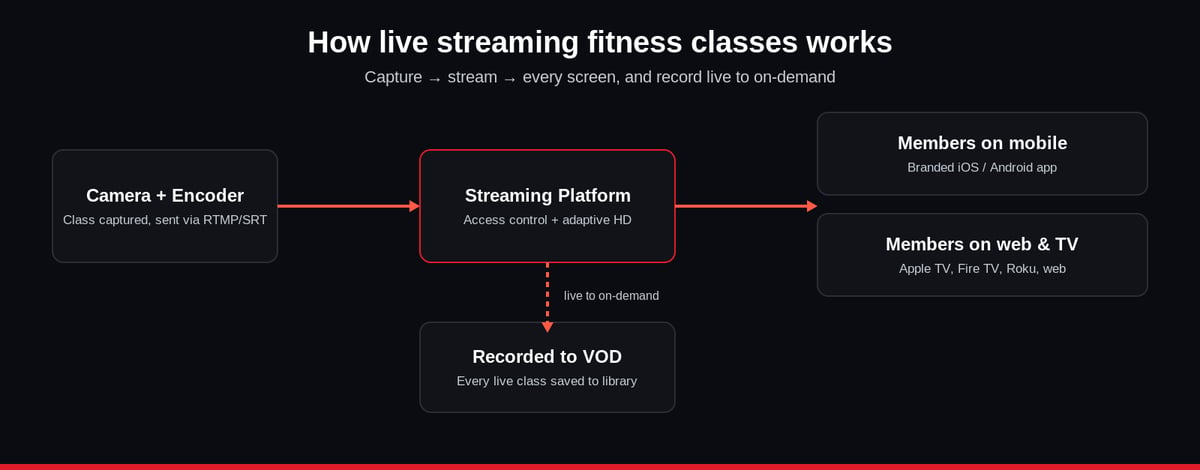
- An encoder. Software like OBS (free) or a hardware encoder captures your camera feed and sends it to your platform. Use a stable, wired internet connection and a sensible bitrate so the stream doesn't buffer.
- Your streaming platform. Point the encoder at your platform's ingest (via RTMP or SRT). This is where you gate access — members log in, non-members hit a paywall.
- Go live to every screen. A good platform delivers the same stream to web, mobile apps and TV apps with adaptive bitrate, so a member on weak Wi-Fi still gets a smooth (if lower-res) class.
- Record to on-demand. Automatically save each live class as VOD so members who missed it can catch up — this is what keeps subscriptions sticky.
Key features to look for
Not all fitness streaming is equal. Prioritise:
- Low-latency, adaptive HD streaming — so instructors can interact in near real time and no one buffers.
- Flexible monetization — subscriptions for regulars, PPV for special events, and ideally hybrid, through a video monetization platform you control.
- Branded apps you own — your logo on the App Store, not a third party's.
- Live-to-VOD — every class recorded and library-ready automatically.
- Analytics — retention, watch-time and drop-off per class, so you program what members actually finish.
Benefits of live streaming fitness classes
For members, the appeal is accessibility and flexibility — a full class from home, on their schedule, with real instructor interaction and form corrections in real time. For the business, live streaming removes the ceiling of studio capacity: a class that fits 20 people in the room can reach hundreds online, and each recorded session keeps earning as on-demand content. It also builds community — members who train together online stay subscribed longer, which is exactly what turns a fitness stream into durable recurring revenue.
Fitness streaming for gyms and studios
For gyms specifically, live streaming is a hybrid play: keep the in-person classes, and add a streaming tier for members who travel, train at home, or want overflow when a class is full. "Streaming TV for gyms" also covers in-facility screens showing branded content. The winning model is usually a dedicated online fitness platform where your gym's brand, schedule and membership all live in one owned app — so a member's relationship is with you, not with a marketplace that can change its terms or take a cut. If you're weighing private, members-only broadcasts, our guide to private live streaming covers the access-control side in depth.
Live vs on-demand fitness: you need both
The strongest fitness services don't choose between live and on-demand — they run both, and let each feed the other. Live classes create urgency, community and the "I have to show up" accountability that keeps members engaged; on-demand gives the flexibility of working out at 6 am or 11 pm. In practice, every live class should be automatically recorded and added to a searchable library, so a member who misses Tuesday's HIIT session can still do it Thursday. That live-to-VOD loop is what lifts retention: members stay subscribed because there is always something scheduled and always something on demand.
Common mistakes when streaming fitness classes
A few avoidable errors sink otherwise-good fitness streams. Under-investing in audio — viewers forgive a soft-focus camera but not muffled instructions or music. Ignoring bitrate and connection — streaming over Wi-Fi at too high a bitrate causes the buffering that makes members cancel; a wired connection and adaptive delivery fix it. Renting instead of owning — building your whole audience inside a third-party marketplace means you don't own the member relationship, the data, or the pricing. And no on-demand backup — if a live class isn't recorded, its value evaporates the moment it ends. Fix these four and your stream looks professional and keeps members paying.
Which platform should you choose?
Independent trainer testing the water: a turnkey tool (Uscreen, Vimeo OTT) gets you live fastest. Developer or agency: infrastructure (Wowza, Brightcove) gives control at the cost of build time. Studio or brand that wants to own the whole experience — branded apps on phone and TV, every monetization model, no revenue share — a white-label OTT platform like Enveu's live streaming platform is built for exactly that, streaming your classes live and recording them to on-demand across 15+ device platforms from one back end. For the wider build, see how to create a live streaming website like Twitch.
Written by Chandan Luthra, Director of Product Engineering and co-founder at Enveu — 13+ years building OTT and streaming platforms.